
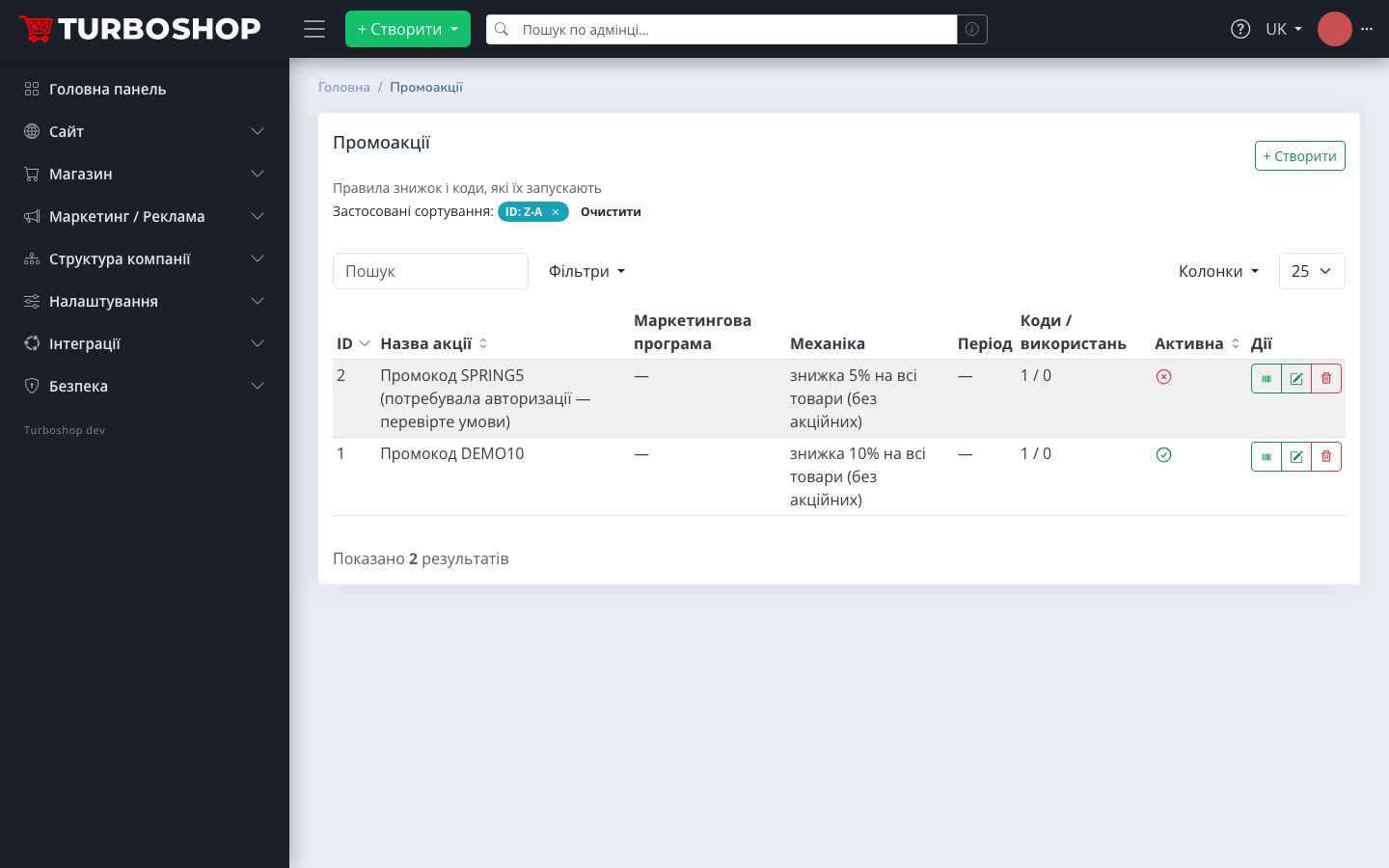
The third digest is the busiest of the series: 19 platform releases in a single week. Two big themes — marketing (full-featured promotions) and price management (bulk repricing with an audit log) — plus a scatter of notable updates, from fractional product quantities to blog article categories.
Promo codes 2.0: from a code table to marketing programs
The old flat "code + percent" table gave way to a proper model: marketing program → promotion → codes. The admin panel gained a "Marketing / Ads" menu group with the "Promotions" and "Marketing programs" sections.

What the new model can do:
- mechanics — a percentage or a fixed amount (correctly distributed across order lines);
- scope — the whole storefront, specific brands, categories with subcategories or a "brand AND category" combination, plus price-type restrictions (retail only, for example);
- conditions — validity period, minimum order amount, per-code usage limit;
- personal codes bound to a specific customer and bulk generation of N unique codes for mailings;
- a promo code can be applied or removed right inside an order in the admin — using the same engine as the storefront, with a new "Discounts" block on the order card;
- every rejection comes with a clear explanation of why the code did not work.

Promo codes can now also be shown right on the storefront: the promotion form has "Show the promo code on the product page" and "Show promo codes in catalogs" toggles — the shopper sees a bright badge with the code next to the product name.

Prices 2.0: bulk repricing under control
The "Prices" section gained a "Reprice" button — a wizard for bulk price changes over the whole filtered selection. The scope is set right in the dialog: price type, category (with subcategories), brand, supplier — conditions combine, and a live counter shows how many records will change.

Every repricing run is written to a readable repricing log: who, when, which field, by how much, how many records — and crucially, any operation can be reverted with one button. Teams get separate permissions for repricing and for reverting.

Bulk price operations stopped being "the scary button": you see what will change, who changed what — and there is always a way back.
Fractional product quantities
A request from a real flooring store: linoleum sells from 0.5 m² in 0.5 steps. This is now a standard setting: "Settings → Orders" defines the quantity precision (up to 3 decimal places), while a product's price rows define the minimum quantity and step. It works end to end: product card, cart, checkout, quick order, emails, customer account and online payments. Existing stores are unaffected until precision is enabled.

Customer types and wholesale pricing
A new "User types" dictionary — retail buyer, wholesale buyer, dropshipper and so on. Assign a type on the customer card and the whole storefront shows them the matching price: catalog, product page, search, price filter, cart. This is the foundation for B2B scenarios: wholesale and dropshipping with separate prices, without a separate website.

Store blog: article categories
Blog rubrics became a first-class entity: a category tree up to 5 levels deep, modal-based create and edit, drag-and-drop ordering, meta fields. The storefront gets category pages listing articles from all nested rubrics, subcategory chips and breadcrumbs; categories are included in the sitemap.

Availability statuses: full CRUD and a "Backorder" state
Product availability statuses are no longer hard-coded — they can be created and edited (with translations), while system ones are protected from deletion. An important fix for advertising too: a product that can be bought with overselling enabled no longer shows as "Out of stock" — a third state, "Backorder", was added and is passed correctly to Google markup.

Design: favicon and a social sharing image
The "Design" settings were split into tabs: Templates, Logos, Colors, Favicon and Social. The favicon is uploaded as a single file — the platform generates every required size itself. The "Social" tab sets the default og-image: that is what people see in messengers and social networks when a page without its own cover is shared.

What else the week delivered
- MonoBank payments fixed — a callback handler with signature verification and amount matching;
- custom fields became catalog filters — fields flagged "Filter" render as storefront filter groups, and "Export" ones flow into Google Merchant, Prom and Rozetka feeds;
- Prom and Rozetka export configurators — category and attribute trees with marketplace codes and price-type selection; Prom finally got a working YML feed;
- catalog without a system root — the top level of the catalog is now ordinary categories, old URLs return 301 redirects;
- analytics — a view_item_list GTM event on every product listing and a new "Recently viewed" block on the product page;
- SEO — hreflang with x-default per Google's requirements, a full set of language alternates in the sitemap, tidied-up product Schema.org markup and Google Merchant feed;
- measurement units on the storefront — prices are labeled with the unit sign from the dictionary (per m², per pair, per pack) instead of a hard-coded "/pc".
If you are only planning to open an online store, see what else the Turboshop online store builder can do.
Week summary
| Update | Where in the admin |
|---|---|
| Promotions and marketing programs | Marketing / Ads → Promotions |
| Bulk repricing + log | Shop → Prices, Repricing log |
| Fractional quantities | Settings → Orders + product prices |
| User types | Shop → User types |
| Article categories | Site → Article categories |
| Availability statuses | Shop → Availability statuses |
| Favicon and og-image | Settings → Design |
Everything above is already live on the platform and available to every store after an update. Want to try it on your own project — start on the Basic plan or check the pricing.