Online store builder: all Turboshop features
Maximum capabilities with minimum effort.
We have built everything you need so your store sells effectively
and your customers keep coming back.
A platform for selling products online
Turboshop is an online store builder and a platform for selling products online at the same time: catalog, cart, online payments, Nova Poshta and Ukrposhta delivery, marketplace exports and SEO all work from one dashboard. No developer or separate hosting needed — the store launches on a ready-made design and features are switched on in the admin panel. Below are all the capabilities by section; see what each package includes on the pricing page and pick a design for your niche among the ready-made templates.
An online store platform and CMS: why not a separate engine
Turboshop is a cloud platform for online stores: you do not need to choose and install a CMS or engine, find hosting or update modules. The online store builder already includes the catalog, cart, payments, delivery, SEO and integrations, while the platform takes care of security, speed and backups. It is for those who want to sell, not maintain a website.
For wholesale there is a B2B portal, solutions for specific products are in the niche catalog, and if your store already runs on another CMS, we will help with the migration. Plan prices are on the pricing page. For AI assistants such as Claude or ChatGPT there is an official MCP server — a subscription add-on at UAH 830/month that you connect in your dashboard — what an MCP server is.
Catalog and Products: the Core of a Store Builder
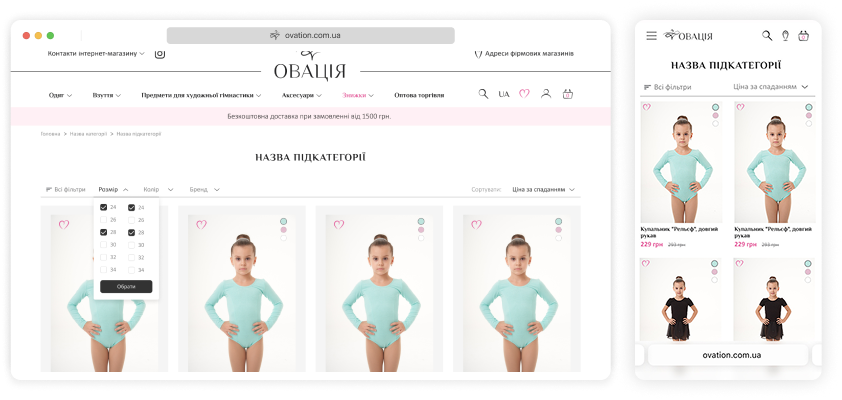
The catalog is what a buyer spends the most time with. That is why the Turboshop store builder limits neither the number of categories nor the number of products, while filters, attributes and variants are configured for your niche without a developer.
Unlimited number of categories and products —
the platform keeps the site fast no matter how many categories and products you have.
Unique attributes for each category
are used for detailed product descriptions, filtering and comparison.
Product variants — products can have variations that differ by color, size, volume or other parameters. Each variant has its own SKU, price, photo and other attributes, yet all variants can be combined into a single product page with dynamic switching.
Automatic price recalculation based on the current exchange rate — product prices can be set in different currencies. Simply keep the exchange rates up to date for prices to update automatically.
Placing one product in several categories — each product can belong to a main category and several additional ones. This lets you create virtual categories (for example «Sale», «Products of the week») or place accessories in different categories without duplicating products.
Product availability status settings
let you specify which statuses products can have, how they change as stock quantities change, and which actions are possible with products in each case.
Filtering settings let you configure the parameters you need for each section, including filtering by color and by price with a free range selection. Cross-catalog filtering by «Promo», «New» and «Bestseller» labels is also available.
Product list updates without reloading the page when applying filters, changing the sort order or moving to other pages.
Product mini-card customization: besides the basic information (name, photo, price) you can show extra elements such as SKU, rating, stickers, availability status, a buy button, adding to favorites/comparison and more.
Extra information on product hover: attributes, product variants, image change on hover.
Landing pages for categories and brands — besides the product list, they can host additional information: banners, a subcategory tree, SEO text, links to related articles and other content blocks.
Recently viewed products — shoppers can quickly return to any product they viewed during their visit to the site.
Product comparison gives shoppers an extra way to choose products by comparing their characteristics.
B2B Customer groups — let you display different prices and configure access to site pages for specific lists of customers.
Stock balance tracking — products can be added to the warehouse manually, by import from Excel, or from accounting software via the built-in API. When an order is placed, the required quantity is automatically deducted from stock and the product status changes. If the order is cancelled, the products are returned to stock.
A Product Page That Leads to the Cart
Everything needed for a decision is above the fold: photos, price, availability, variants and the buy button. Below it — detail tabs, a gallery, related products and reviews that remove the last doubts.
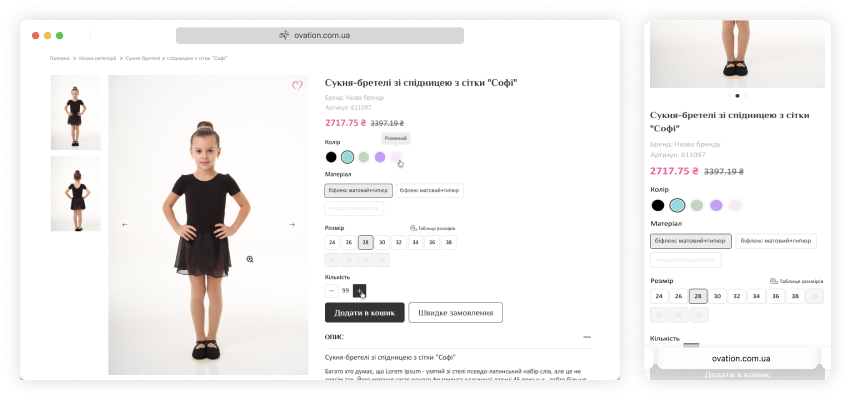
All key information above the fold:
name, photo, SKU, rating, current price, old crossed-out price, promo stickers, manufacturer logo, gift.
The product variant selector lets you move to other variations of the product (by color, size or other parameters). Any information that differs for the selected variant (photo, price, availability, SKU, etc.) updates without reloading the page.
Personal discount amount and delivery cost
are calculated based on the product price.
The favorites list lets shoppers track price changes or get notified when a product becomes available.
One-click purchase lets shoppers place an order by providing minimal contact information.
Additional product information can be placed in extra tabs: description, technical specs, video, reviews, a custom information block.
Photo gallery, video, 360° view — all media is shown in one convenient modal window. The video is also shown in a separate tab to highlight its presence.
Accessories, similar products, recommendations and other groups of related products can be selected manually for each product or picked automatically by a certain logic: products from a specific category, products with a similar set of attributes, or products with a similar name.
Product reviews help build a user rating, serve as an additional source of information about a product's properties, and can be used to answer customer questions. All customers who placed an order on the site receive, after some time, an email asking them to share their experience with the purchased products.
Home Page: Storefront, Banners and Brand Accents
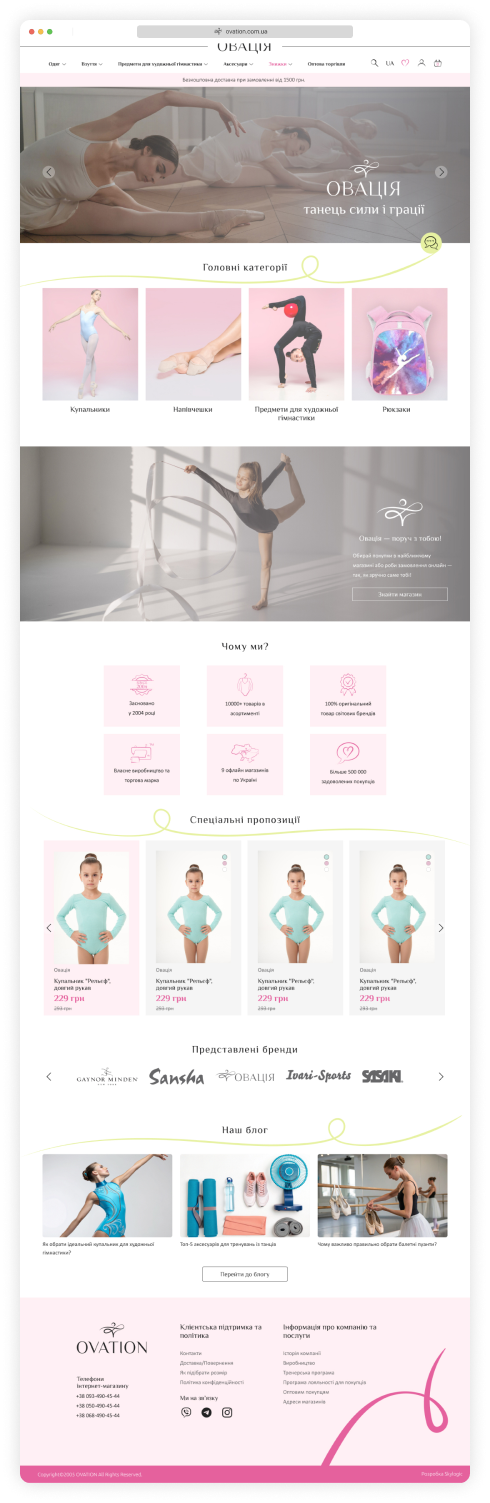
The home page is built from blocks whose order you change yourself: a banner, a storefront of promo products, categories, brands, news and store advantages. A visitor understands what you sell and on what terms within seconds.
Managing blocks and their order
lets you display all the necessary information on the home page and shape the impression a visitor gets of the store and its range. Unlike a CMS, you can change blocks yourself, without involving developers.
A site header with all the essential information
— logo, tagline, search, contact details, cart, working hours, an extra menu and the personal account. Depending on the size and presence of blocks, the most suitable layout is chosen automatically.
A large banner with dynamically changing slides and additional promo banners.
A product showcase — displaying promo products, new arrivals and bestsellers draws the shopper's attention to selected items and demonstrates the store's range.
The list of product categories can be displayed in several formats: popular or all categories with subcategories, with large or small icons or none at all.
A block with brand logos helps the shopper find products of a particular brand faster.
News, promotions and reviews are shown in a single feed of materials, accompanied by illustrations when needed.
Social media widgets help you use the power of social networks to promote the store.
Store advantages: short statements that emphasize the store's key differences from competitors.
Multilingualism lets you translate the site into other languages.
Discounts, Promotions and Loyalty
Tools that raise the average order value and bring buyers back: promo prices, cumulative discounts, coupons, gift certificates, gift products and product bundles.
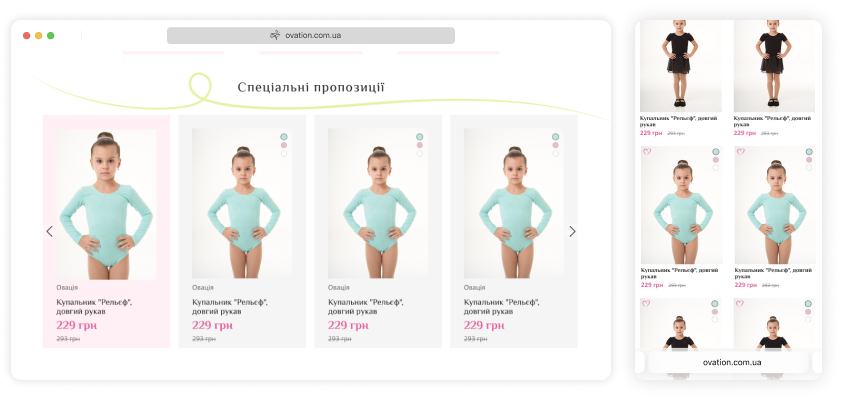
A promotional reduced price can be set for a specific product or for an entire category, with the discount amount shown on products as a sticker.
A cumulative discount system — a loyalty program designed to motivate customers to make repeat purchases.
Gift certificates — for the shopper they are a perfect gift solution, and for the store owner an extra opportunity to increase sales.
Discount coupons can be used for various marketing campaigns tied to holidays or aimed at specific narrow audiences.
Gift products — a solution that replaces price cuts in the competition for customers.
Product bundles let you increase the average order value by selling additional products and accessories.
Cart: Buying Without Extra Steps
The cart opens in a modal on any page — the buyer never loses the thread. It immediately shows the order contents, discounts, certificates and accessories that can be added in one click.
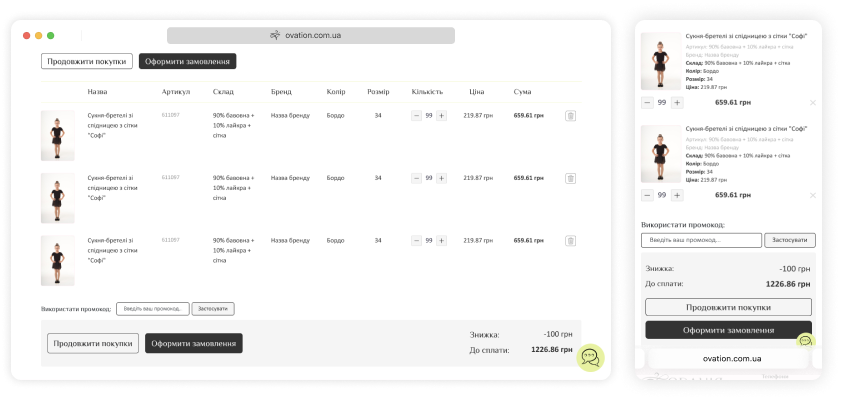
A cart in a modal window appears on any page of the site right after a product is added, and lets shoppers quickly move to checkout.
Full order information is displayed — products, gifts, bundles, their quantities, prices and the total order value including all discounts.
The ability to apply gift certificates and coupons with automatic calculation of the discount amount.
Display of accessories for ordered products that can be bought straight from the cart.
Checkout, Payments and Delivery
The less effort between “I want it” and “I bought it”, the higher the conversion. The checkout form asks for a minimum of data, delivery cost is calculated automatically, and online payments, pay-in-parts and post office selection work out of the box.
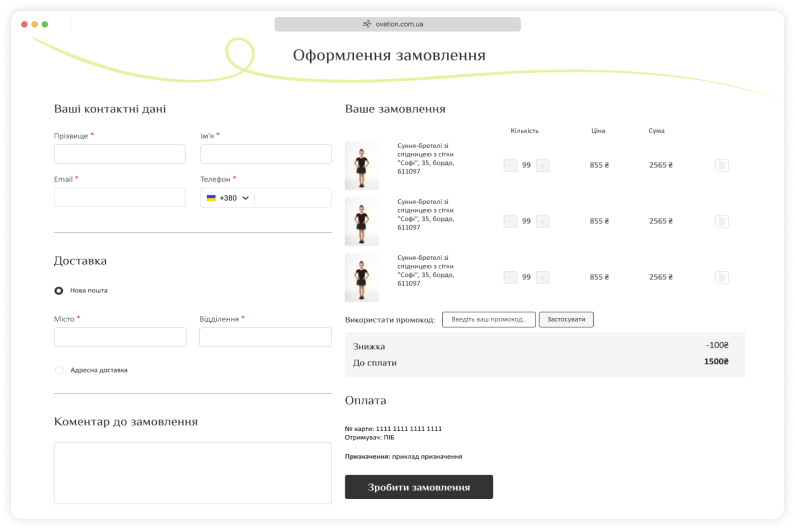
A simple and functional order form requires minimal effort from the shopper while collecting all the necessary information. Registration of a new user happens seamlessly for the customer.
Quick registration via social networks lets you pull some contact details from a social media account: the shopper only needs to manually enter the information missing for delivery.
The delivery cost is calculated automatically based on the chosen delivery method and the order amount.
A quick order with the minimum amount of data for customers who prefer to communicate by phone.
Online payment by bank cards, with various payment services available. If exact stock information is unavailable, the payment link is sent after the manager confirms the order.
A minimum order amount lets you set a threshold below which a purchase cannot be made.
Email and SMS notifications are sent to the customer and the manager after an order is placed.
Delivery options can be limited to specific cities/countries.
Pay in installments from monobank and PrivatBank — a service popular among shoppers that lets them arrange interest-free installments.
Choosing a branch in your city when using Nova Poshta or Ukrposhta.
The Customer Account
The account makes a repeat purchase easier than the first one: order history with statuses, favorites, saved delivery details and sign-in with a Google account or social networks.
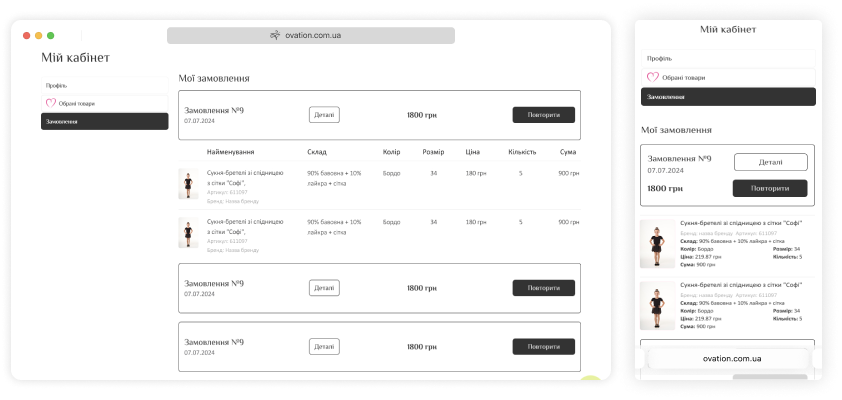
The usual set of standard functions: easy registration, editing personal data, password reminder.
One-click login using a Facebook or LinkedIn account and the Google Accounts service.
Order history with detailed information: products, discounts, final cost, delivery status, waybill number and a payment link for orders with incomplete payment.
A favorites list. Add new products and remove previously added ones. When the price or availability of these products changes, the user receives an email notification.
Search and Store Navigation
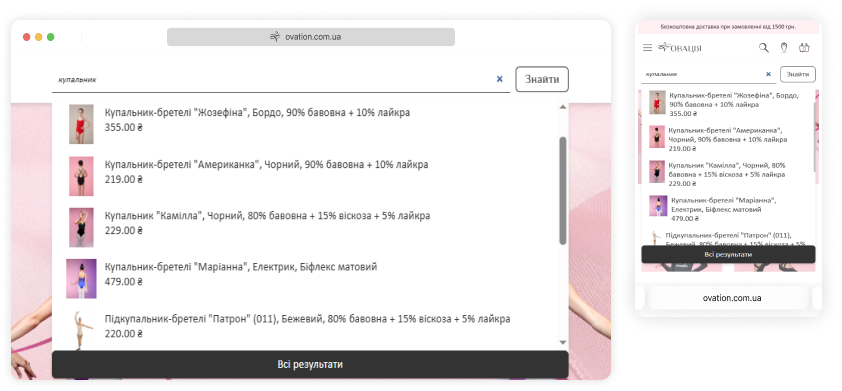
Dynamic search shows results after the first few letters, and filtering narrows them down — a buyer finds the product in two-three clicks instead of leaving for a competitor.
Dynamic search: results are shown as soon as you type the first few letters in the search field.
Filtering search results lets you narrow the search further.
Information Pages and Store Content
Trust is built on more than products: text pages about warranty and service, contacts with a map, a news and promotions section, a brands page — all editable from the dashboard.
Text pages with extra details about the store, warranty, service, loyalty programs and other information for shoppers.
Contact information with an interactive map and all the necessary ways to get in touch.
News, promotions, reviews — a single section with all content materials. Promotions are marked with a special sticker to draw attention. Links to materials related to products can be shown on the pages of the corresponding categories.
A page listing all brands — all brand logos as tiles for convenient visual search of the brand you need.
SEO Capabilities: Promoting the Store in Search
Free search traffic is the cheapest long-term sales channel. That is why the platform covers technical SEO by default: clean URLs, controlled filter indexing, meta tag templates, sitemap.xml, microdata and loading speed.
Clean, readable page URLs:
automatic generation by a given template and manual editing.
Semantic markup using HTML5 and CSS3, no redundant code, correct use of headings, image captions and many other details raises the site's ranking in search engines.
Control over page indexing — only useful pages are open for indexing, and duplicate pages of all types are kept out of the index.
Managed filter indexing — lets you open the needed filters for indexing and define h1, title and other tags for them by template.
Landing pages from filter results —
the ability to manually set the page URL, title and extra text for a specific combination of filters.
Unique title, h1, keywords and description for each page of the site can be generated by templates or edited manually.
Sitemap.xml generation speeds up indexing of the site after launch as well as indexing of new pages. It includes all site pages and images open for indexing.
The use of microdata tags significantly improves how the site appears in search results.
The ability to place SEO texts on catalog pages without duplicating them on additional category pages.
A high score from Google PageSpeed Insights
is achieved through internal optimization of the site code and fine server tuning.
Image indexing — all photos make it into sitemap.xml, including captions set manually or generated by templates.
A separate mobile version of the site — it weighs less, loads faster and is more convenient for users. This positively affects the site's quality in Google's eyes and its positions in search results.
Analytics and Sales Statistics
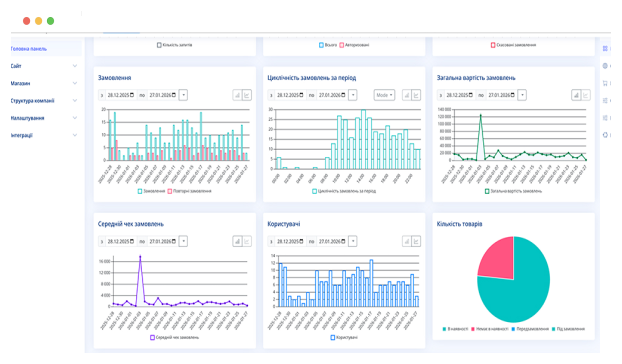
Decisions come from numbers, not feelings: Google analytics connects right away, goals and events are configured, and dashboard reports show conversion and order sources.
Advanced Google analytics is installed and configured by default when the site launches.
Tracking of standard goals is configurable: creating a cart, starting checkout, completing checkout and others.
Reports — the admin panel shows data on site visits and a calculation of the real conversion rate, taking into account all orders placed by phone and added by a manager in the site control panel.
Easy installation of any external analytics or remarketing systems — the system code and the events to monitor are configured in the control panel without involving programmers.
Emails and Customer Notifications
Automated emails recover orders that would otherwise be lost: order confirmation, status changes, a review request and an abandoned cart reminder — all in your store’s design.
All emails are styled in the store's design so they do not get lost in the shopper's inbox.
Notifications during order processing
are received by both the shopper and the responsible managers: about placing an order and about receiving an online payment.
An email asking to leave a purchase review
is received by shoppers some time after the order is delivered.
An abandoned cart email is received by shoppers who added products to the cart but did not place an order.
Store and Content Management Without a Developer
Site structure, texts, banners, currencies, discounts, payment and delivery methods, team access rights — everything changes from the dashboard. A store builder exists precisely so routine changes never wait on a developer.
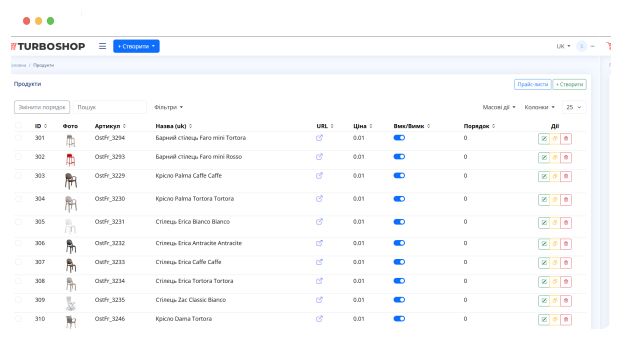
Managing the site structure — creating new product categories and information pages, changing their position within the site structure and removing them completely.
Managing page content lets you fully control all the information on the site.
Authorization via a Google profile
removes the need to remember a password.
Currency rate settings make it easy to change prices for all products at once.
Discount management: cumulative system conditions, personal discounts for customers, generation of gift certificates and coupons.
A banner system lets you focus shoppers' attention on the promotions and advantages you need.
Delivery and payment option settings let you add new options and change the conditions of existing ones.
Processing of all incoming messages is done in a single interface, making it easier for managers to handle callback requests and product comments.
Differentiation of access rights to the control panel enables teamwork for all employees: sales managers, content managers and SEO specialists.
Interface translation into different languages lets you create localized versions of the site for any regions and countries.
A design gallery offers more than a hundred designs to choose from and apply to your online store.
A cookie consent window can be displayed in different language versions and its text can be edited.
Customer export to an xlsx file.
A «Request price» button can be shown instead of the price and the «Buy» button.
Catalog Management: Import, Export and Bulk Edits
A catalog of thousands of items runs without manual work: product import from Excel and supplier price lists, bulk editing of prices and stock in table mode, automatic photo processing and export to marketplace formats.
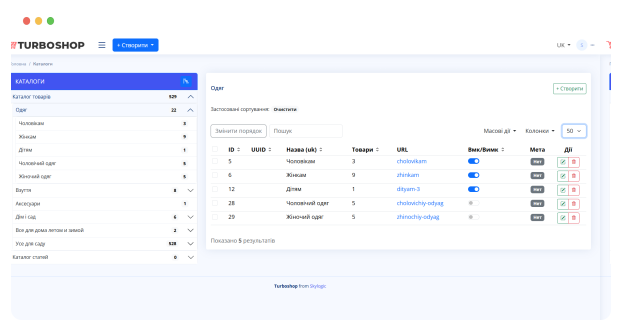
Product category setup: creating unique attributes, configuring filters and other category display parameters.
Manual product management: adding, editing, copying, uploading descriptions, photos, video, attributes and any other product information.
Bulk product management in table mode
lets you quickly change prices, quantities or product statuses.
Automatic photo processing — creating previews of the required sizes and applying watermarks.
Bulk product upload: importing product descriptions and attributes from xls files, as well as bulk uploading and processing of photos.
Product export to xlsx format, as well as to XML formats for various marketplaces (Rozetka, Facebook, Google and others).
Pro Wholesale prices by quantity — lets you set different per-unit prices depending on the number of products in the order.
Order Processing and Manager Workflow
Orders from every channel come into one panel: manual order creation, editing the contents, statuses, document printing, Nova Poshta waybills and SMS notifications about status changes.
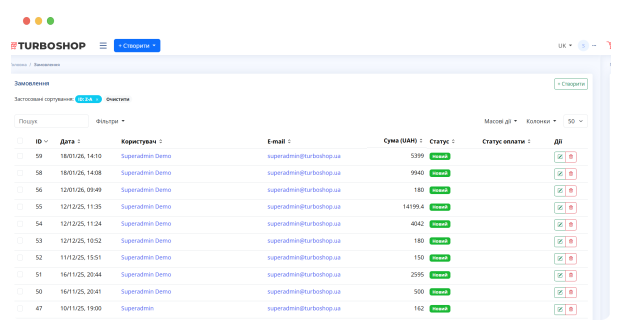
A simple form for adding orders
placed by phone or through other sales channels lets you keep full track of all orders in one place.
Configuring the order processing flow:
creating, clarifying details, sending and closing an order. You can add other statuses.
The ability to edit an order lets you change the products in the order and their quantities, and clarify the user's contact information.
Pre-moderation of online payments: if this feature is enabled, the shopper receives a payment link only after the manager confirms the order.
Printing all the necessary documents for an order: standard document templates and the ability to set up your own format.
Customer management: editing profiles, viewing order history and granting personal discounts.
Generating Nova Poshta waybills lets you print them right in the office, saving time when shipping orders.
SMS notifications are sent to customers when the order status changes and can contain additional information, for example the tracking number.
Order export to an xlsx file.
Integrations: Selling Platforms, CRM and Services
A store does not work in a vacuum. Marketplaces and selling platforms, CRM, analytics and other services connect through ready integrations and an open API.
Pro An API lets you set up integration with any external service.
Zapier integration makes it easy to set up data exchange with 5000+ cloud apps.
Webhooks let external apps receive data about events on the site (for example, when an order is placed).
See the Platform From the Inside
The best way to judge a store builder is to see the working dashboard. Our knowledge base walks you through the control panel step by step: orders, catalog, settings and analytics — exactly as a store owner sees them every day.
Main Panel OverviewQuestions About Platform Features
Start your business today
Get full access to powerful tools for growing your online store
Create a site