

At Turboshop we know what a store owner's morning looks like. Open the order list and count what has been paid. Go to products and check what is running out. Then carts, the UTM report, payment statuses. Half an hour of clicking to answer one question: "how are we doing?". And whatever you did not get to check quietly costs money: a paid order sits unprocessed, a best-seller has already sold out, and nobody followed up on a 70,000 UAH cart. So we made it possible to answer that question in words. You connect your store to Claude or ChatGPT and ask the way you would ask an experienced analyst: "How much did we make this week compared to last?", "What will run out in two weeks?", "Where am I losing money right now?". The assistant reads the store reports itself and answers in a minute.
Why we built the AI assistant into the platform instead of offering an "API for enthusiasts"
Technically, you could connect ChatGPT to a store before: write a script, give it an API key, set up a proxy server. We have seen such home-made setups, and they share three problems. The key sits in someone's config and opens the whole store, including customers' phones and addresses. The assistant calculates "API numbers" on its own, and differently each time: one revenue figure today, another tomorrow. And when something breaks, nobody knows where to look.
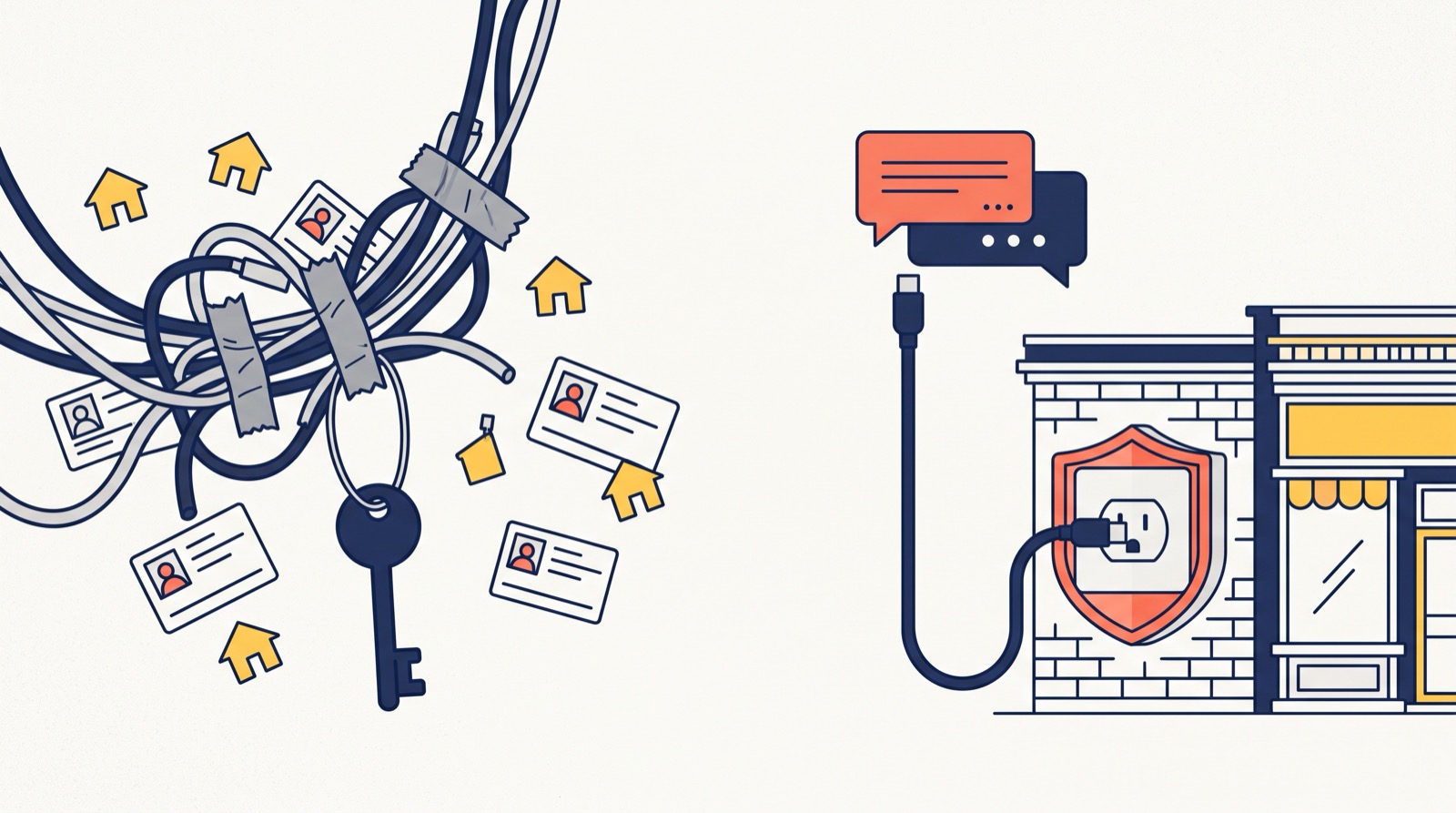
So we made the AI assistant part of the Turboshop engine — and became one of the first Ukrainian e-commerce platforms with an official MCP server. It is the store's official MCP server: MCP (Model Context Protocol) is an open standard that lets Claude, ChatGPT and other AI services connect to external systems. We described to the assistant ourselves what "paid", "awaiting cash on delivery" or "abandoned cart" mean, so it takes ready, verified figures instead of inventing its own math. And we decided ourselves what it cannot see and cannot do.
What you can ask: real answers from the demo store
We connected Claude to our demo store and asked it a few ordinary owner questions. Below is what the store returned (demo data, amounts in UAH).
"How did this week go compared to the previous one?" The assistant gets the sales summary and names net amount and paid amount first: net 885,859 UAH versus 376,229 UAH a week earlier (+135.5%), of which 440,361 UAH paid — 402,697 UAH online and 37,664 UAH on delivery. It also sees that 297,079 UAH in cash-on-delivery orders is still in transit and warns on its own that "paid" is understated for now. Average order value is 21,606 UAH versus 10,451 UAH. Canceled orders are excluded, and there are 24 unfinished carts worth 329,851 UAH this week.
"What will run out soon?" The assistant uses 30-day sales velocity and lists products that will last two weeks or less: one garden swing sofa is left, roughly one day of sales. A separate block shows items already out of stock but still in demand: a shirt that is no longer in stock costs the store about 3,990 UAH of lost revenue per day.
"What time of day do people buy?" A 30-day breakdown by hour shows peaks at 01:00, 07:00 and in the evening from 18:00 to 22:00 — a ready hint for when to send newsletters and when a manager should be online.
"Who abandoned a cart and whom can we contact?" Nine abandoned carts with contact details this week; the largest is 74,717 UAH with three items. The assistant sees the buyer's name only as initials, and the link leads to the admin "Carts" section, where a manager sees the full data.
What it looks like in the admin panel
The admin menu now has "Integrations → AI assistant (MCP)". We deliberately made the feature off by default: until you switch it on and confirm, the store shares nothing with anyone.

Once enabled, you get the connection address with a "Copy" button and short instructions for Claude and ChatGPT. You paste this address into your assistant's connector settings.
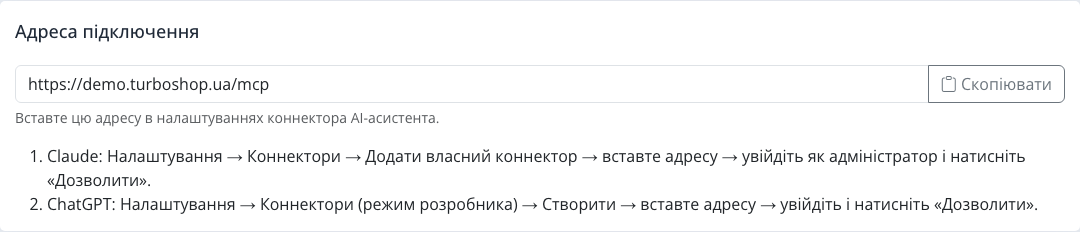
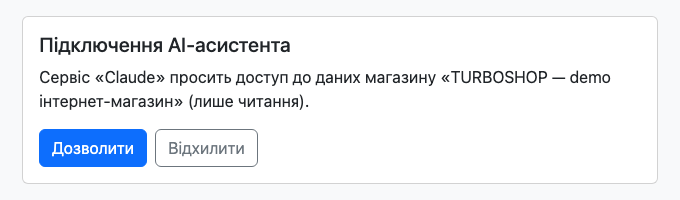
When the assistant contacts the store for the first time, the store asks you to sign in to the admin panel as an administrator (with a two-factor code if enabled) and explicitly allow access. Only the Superadmin and Administrator roles can connect an assistant — a manager cannot.
All connections are listed in a table: who connected, which service, when, and last activity. The "Disconnect" button revokes access in one click.

Further down the page is the list of what the assistant can see, so you know the limits of access before connecting.
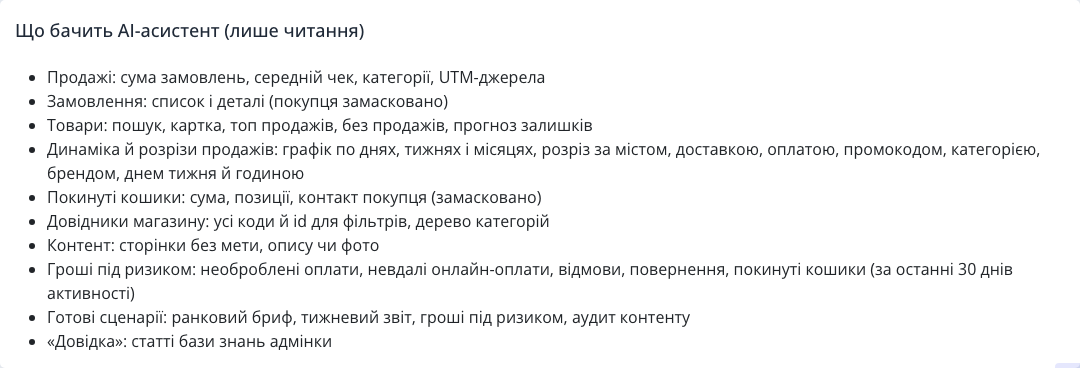
Security: what the assistant sees and what it does not
- Read-only. The assistant cannot change a price, an order status or settings. This is architecture, not a promise: every server tool is marked read-only, and the engine's automated tests enforce it.
- Customer personal data is masked. Names become "Olena K." or initials, phone and e-mail are partially hidden, and address, waybill number and order comment are not shared at all.
- Allowed services only. Claude, ChatGPT, plus Claude Code and Cursor. Sign-in uses the OAuth 2.1 standard, with no keys in other people's configs.
- Log. Every assistant request, sign-in, enable or disable is written to a separate store log — without passwords or customer data.
- Switch everything off at once. The "Allow connections" switch disables the assistant and cuts all connections.
Ready scenarios instead of a blank page
So you do not have to invent questions every morning, we gave the assistant four ready scenarios. Morning brief — yesterday's sales versus the same day a week earlier, the five largest amounts at risk, five products running out, and three actions for today. Weekly report — daily trend, best and worst categories, channels and conclusions. Money at risk — orders and carts where you are losing money, with a concrete action for each. Content audit — pages missing a description, meta tags or photos, starting with products that sell. In Claude, scenarios appear in the menu next to the message box; if your assistant does not show them, just type "Make a morning brief".

Who benefits most
- Clothing or shoe stores. "Which sizes of the best-sellers will run out before the weekend?" — instead of checking stock item by item.
- Furniture, electronics, high order value. One abandoned cart here is tens of thousands of hryvnias. Every morning the assistant shows whom to call first.
- Cosmetics and ad-driven products. "Which UTM campaigns brought paid orders this month?" — an answer with breakdown and share, no spreadsheet exports.
- Owners who work from a phone. A question in the Claude or ChatGPT app instead of the admin panel on a small screen.
How to connect the AI assistant to your store
The AI assistant is not part of the standard store package: we connect it individually, on request. This way we check that the store server meets the security requirements and go through the first connection together with you. After that it is simple:
- Leave a request — we install the module and check the server.
- In the admin panel open "Integrations → AI assistant (MCP)", switch it on and copy the connection address.
- In Claude: "Settings → Connectors → Add custom connector". In ChatGPT: "Settings → Connectors" in developer mode.
- Paste the address, sign in to the admin panel and click "Allow".
FAQ
Can the assistant change anything in the store? No. It only reads reports: orders, products, settings and prices stay untouched.
Does it see customers' phones and addresses? No. Names and contacts are masked; address, waybill number and comment are not shared. Full data is only in the admin panel, via the link in the answer.
Can I trust the numbers? Yes, because the assistant does not calculate them itself: the store returns ready totals with an explanation of what they include. Net, paid and pending always add up to placed orders.
What do I need on my side? A Claude or ChatGPT account with access to connectors (the service sets its own terms) and an administrator role in the store.
What should I do after a store update? We regularly add new capabilities to the assistant. To make it see them, disconnect and reconnect the connector — it takes a minute.
The AI assistant is just one of the platform's capabilities. If you are only planning to create an online store, see what else the Turboshop online store builder can do.
Summary: what you get
We made the store answer you in words. You get an official AI assistant built into the platform: sales, stock, abandoned carts and money at risk in a minute, in Claude or ChatGPT, without access to customer personal data and without the right to change anything. Other new platform features are in the "Features" section.