

We at Turboshop have watched the same picture for years: a store launches a free-shipping promotion, spends money on ads, and the site itself mentions it only in a banner somewhere in the middle of the home page. A visitor lands on a product page from search — and never learns about the promotion at all. The most visible spot on any page, the thin strip above the header, was simply sitting empty. So we built the "Announcement bar" widget: a message above the header about a promotion, free shipping or a new collection — with a link, a countdown to the end and a display schedule. And we deliberately put it first in our widget series: it is the easiest one to start with, and you see the payoff from day one.
What a store loses without a bar, and why we built it
We see it in our customers' stores: most visitors do not enter through the home page but land straight on a product page or a category — from search, ads, price aggregators. If your main offer lives only on the home page, most of the people you paid for will never see it. The bar is a message you want every visitor to see, on every page, without taking space from the main content. These are the scenarios we had in mind when we designed this top bar widget:
- "Free shipping from 1500 ₴ — this week only" — an incentive to fill the cart up to the threshold;
- a sale announcement with a countdown to the end — honest urgency without half-screen banners;
- a warning about a price increase from the next delivery — an honest reason to buy now, while the old price still applies;
- a seasonal notice: holiday working hours, a new collection, a new pickup point;
- terms for a specific audience: a bar for signed-in customers only, or only in the catalogue section.

Imagine a visitor who lands on a sneaker page from an ad and, before reading the description, sees above the header: "Free shipping from 1500 ₴ — this week only". They have not compared prices yet, but they already know why it is worth buying now and from you. That is exactly the effect we built the promotion bar for online stores to create.
Up to three messages, each with its own link
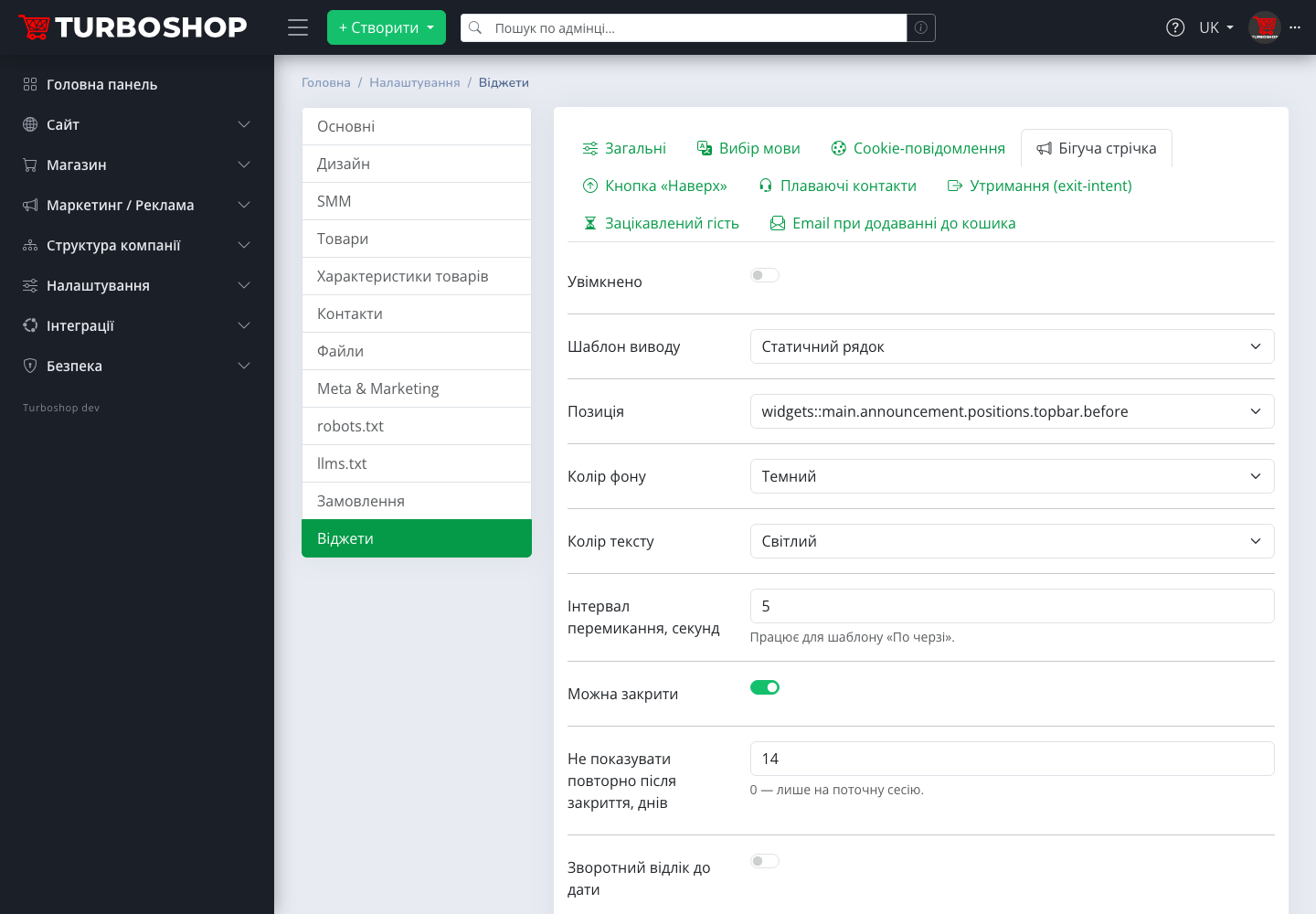
We limited the bar to three messages on purpose: any more and the strip turns into noise that shoppers stop reading. The widget tab has a block "Messages (up to 3, each with an optional link)". For each message there is a text in Ukrainian and Russian and a "Link" field. The link can lead to the promotion page, a product selection or an article with shipping terms, so the bar does not just inform — it takes the visitor to the place where they spend money. We pre-filled the first message with a sample; the second and third are empty, and an empty message is simply not shown.
We made the bar closable because we respect the shopper's choice: the "Can be closed" toggle adds a cross, and the "Do not show again after closing, days" field sets how many days it stays hidden for that visitor. A value of 0 means "for the current session only". You get a visible strip that does not annoy those who have already read it — and an annoyed visitor, as we know, does not buy.
Three display templates: we built them for different jobs
We did not want to offer one "fits all" option, because permanent shipping terms and a three-day sale need different treatment. The "Display template" field offers three options:
- "Static line" — one message centred, the calmest option for permanent terms such as a free-shipping threshold;
- "Marquee" — the text glides from left to right like a news ticker. Motion draws the eye to a short promotion;
- "Rotate" — messages replace each other at the interval from the "Rotation interval, seconds" field. That is how you show three different offers on one strip.

You choose the position yourself: "Above the header" or "Below the header". We take background and text colours from your theme palette — "Primary", "Secondary", "Dark", "Light" — and we did that deliberately: we have seen too many "acid-coloured" bars from third-party services that looked alien on a tidy storefront. Your bar will look like part of the design, with no manual colour picking.
Countdown to a date: urgency that does not lie
We built the bar's strongest tool so that it cannot deceive. The "Countdown to a date" toggle together with the "End date and time" field adds a counter of days, hours and minutes "until the end of the promotion" next to the text. We deliberately tied the countdown to sale end to a real date: when it passes, the counter disappears by itself, and if no date is set or it is in the past, the countdown is simply not shown.
We refused on principle to add "eternal last hours" that reset on every visit: shoppers recognise that trick quickly, and along with trust in the counter you lose trust in the store. An honest countdown works for you: the visitor sees that time really is short and decides today, not "some day later".
Schedule and display rules: so you do not have to keep the sale in your head
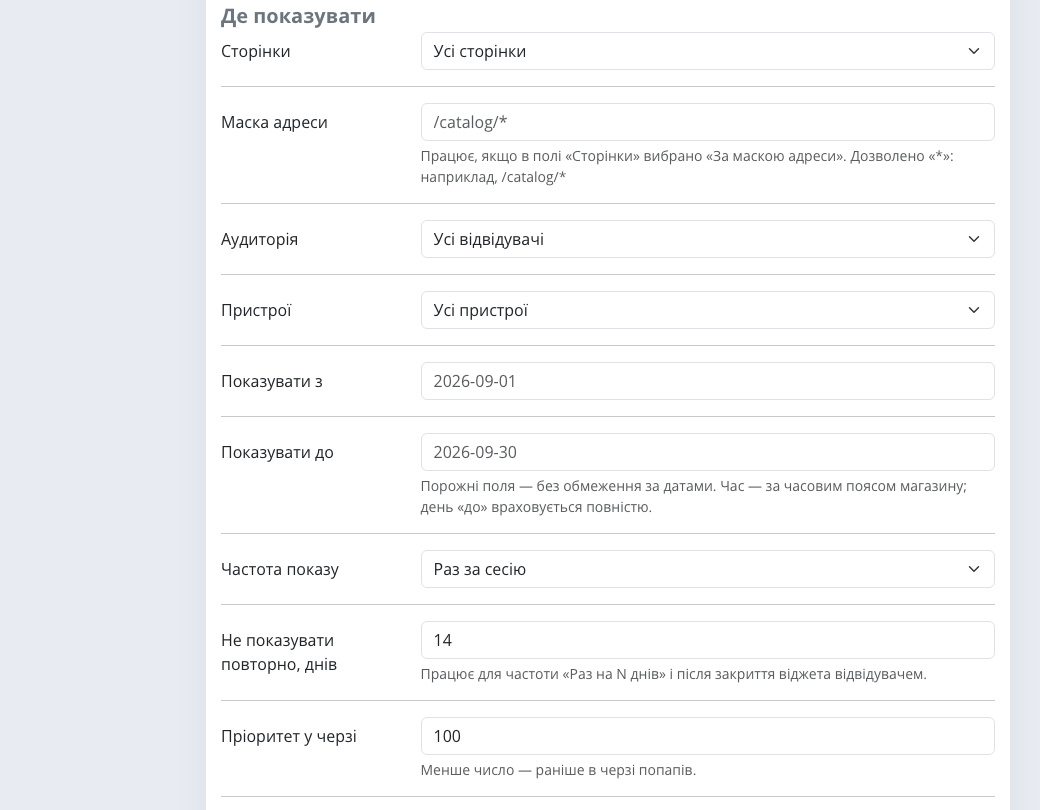
We know how it goes: a "sale until Sunday" is still up on Wednesday because Monday was too busy. A shopper sees an expired promise — and you either give a discount you no longer planned or argue with the person and lose them. That is why, in the "Where to show" block shared by all widgets, we made the two fields that matter most for promotions: "Show from" and "Show until". Set the dates in advance — the bar switches itself on the first day and disappears on the last, in the store's time zone.
The other rules work too: "Pages" (all, home, catalogue, product or by a URL mask such as /catalog/*), "Audience" (all, guests, signed-in, new visitors), "Devices", "Display frequency". For example, you can show dealer terms to signed-in customers only and only in the catalogue — a retail visitor will not even see them.
Mobile version and SEO: two decisions we made deliberately
On phones we fitted the bar into a single line so it does not cover the header with the cart: in our customers' stores most orders are placed from mobile, and every extra pixel above the header pushes the product further down. And an important difference from the other widgets: search engine robots see the bar. We hide all popups from bots so as not to clutter the index, while the website ticker text is indexed as regular page text — so your promotional offer may even show up in a search snippet, before the visitor reaches the site.

How to enable it in a minute
- Open "Settings → Widgets", the "Announcement bar" tab.
- Switch on "Enabled", edit the first message and add a link.
- Choose the template and position, and a countdown to a date if needed.
- In the "Where to show" block set the promotion schedule.
- Click "Save", then "Preview" — and look at all three templates without changing the settings.
Examples by niche: how we recommend using the bar
- Clothing. "Rotate" with three messages: shipping, new collection, sale with a countdown — in a few seconds the shopper sees all three reasons to stay.
- Electronics. A static line about a price increase on a series from the next delivery: an honest explanation of why ordering today is the better deal.
- Groceries and food delivery. A static line about the minimum order and today's delivery hours — fewer "will you still deliver today?" calls.
- Wholesale supplier. A bar with the
/catalog/*mask and the "Signed-in only" audience — dealer terms are seen by dealers only. - Seasonal business. A "from / until" schedule for holiday hours that disappears by itself after the holidays.
Analytics: bar impressions and link clicks
The bar sends an impression event and a click event for the link in a message to analytics. So in Google Analytics you see not only that the bar was seen, but how many people clicked each offer, and you can compare what works better: free shipping or a countdown to the end of the sale.
FAQ
Can I show different bars on different pages? There is one bar, but with three messages and "Where to show" rules. For different sections use a URL mask or the pages list.
What happens when the promotion ends? If "Show until" is set, the bar disappears by itself. The countdown also disappears after the end.
Does the bar slow the site down? No: we added no JavaScript libraries of our own to the widgets module, and the "show or not" decision is made on the server, so pages remain cacheable.
How do I see the result before customers do? The "Preview" button at the end of the tab shows the bar in the real theme layout, switching between all three templates.
If you are only planning to open an online store, pick an online store template for your niche — it can be customized without a developer.
Summary: what you get
We built the announcement bar so that your main offer reaches every visitor on every page — without a developer, without third-party services and without expired promotions. You get one settings tab, three templates, an honest countdown to a date and a schedule that does everything on its own. The general overview of the section with all eight widgets is in "Storefront widgets in Turboshop", and all new platform capabilities are in the "Features" rubric.