

We at Turboshop have watched the same scenario play out in our clients' stores for a long time. A person orders a gift for their mum in another city, pays by card, and types mum's number into the "Phone" field, because "she is the one picking up the parcel". Then the manager calls to confirm the order and reaches a puzzled woman who never ordered anything. Or the other way round: the buyer enters their own phone, and the Nova Poshta courier cannot reach the recipient. Every such case is an extra call, a one-day delay, and sometimes a cancelled order. So we added a single checkbox to checkout, "Specify another recipient", and carried the recipient's details through the whole order journey: from the storefront form to the Nova Poshta waybill.
What a store loses when the buyer and the recipient are different people
Gifts, orders for parents, purchases for employees, dropshipping where your business client orders straight to their own customer: all of these are cases where one person pays and another picks up the parcel. In our clients' stores we consistently see five to fifteen percent of such orders, and far more before holidays. Without dedicated fields the buyer has to either write the recipient's details in the comment or replace their own phone with someone else's. In the first case the manager retypes the data into the waybill by hand; in the second the store loses contact with the person who actually pays and who should receive the next offer.
- the manager calls to "confirm the order" a person who knows nothing about it;
- the buyer ends up on the Nova Poshta waybill instead of the person collecting the parcel, and the branch refuses to hand it over;
- the buyer's phone is lost because they typed the recipient's number instead;
- details from the comment are retyped manually, with mistakes in surnames and numbers.
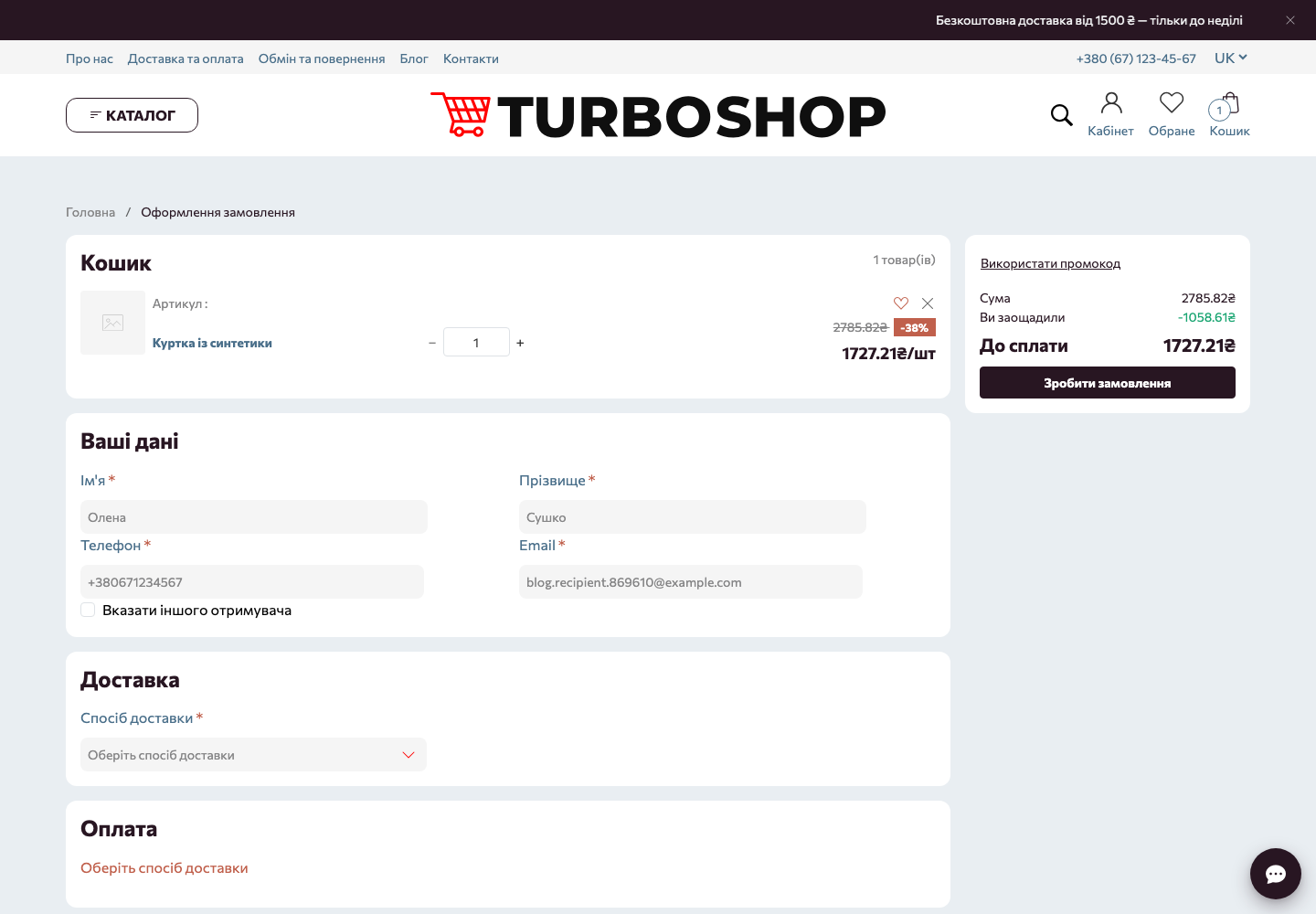
One checkbox and two fields: what the buyer sees
We deliberately did not add another big block to checkout: every extra field on the checkout page lowers conversion. The buyer sees only a small checkbox, "Specify another recipient", in the "Your details" block, right under their own name, phone and email. If they are picking up the parcel themselves, they simply ignore it. If the recipient is someone else, a click instantly reveals two required fields, with no page reload:
- "Recipient's full name" with the hint "Surname, first name, patronymic of the recipient";
- "Recipient's phone" in the +380 format.
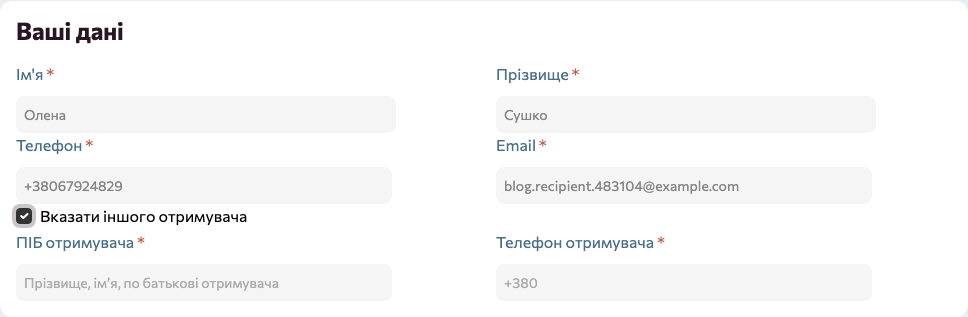
Both fields are validated as strictly as the buyer's own details: the phone must be a real number (ten to fifteen digits) and the name at least two characters. We did this on purpose: a wrong recipient number costs the store more than a wrong buyer number, because that is the number the Nova Poshta SMS goes to.
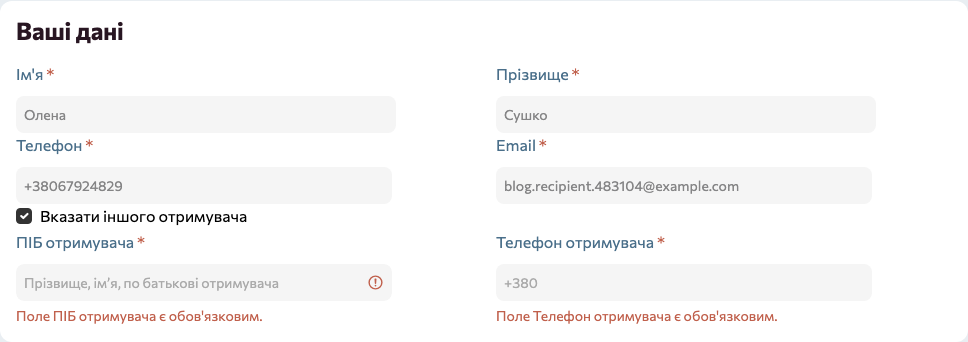
There is one more detail we thought through: if the buyer fills in the fields, changes their mind and unticks the checkbox, the recipient's data never reaches the order. You will never get a "half-filled" recipient you have to clarify by phone. And we left the "Quick order in 1 click" without these fields: its whole point is the minimum of steps, and adding a recipient there would defeat it.
The manager sees the recipient where the order is processed
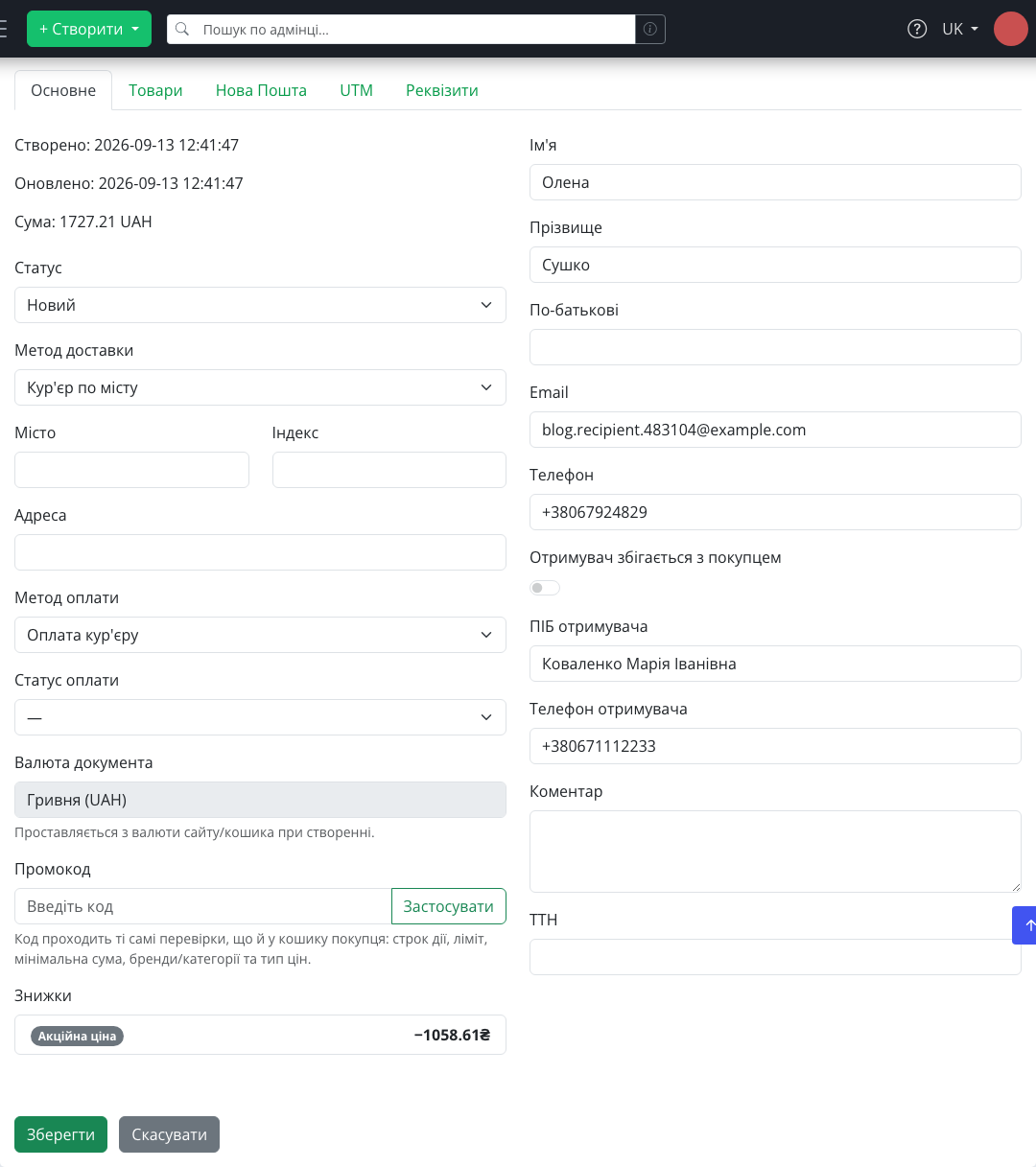
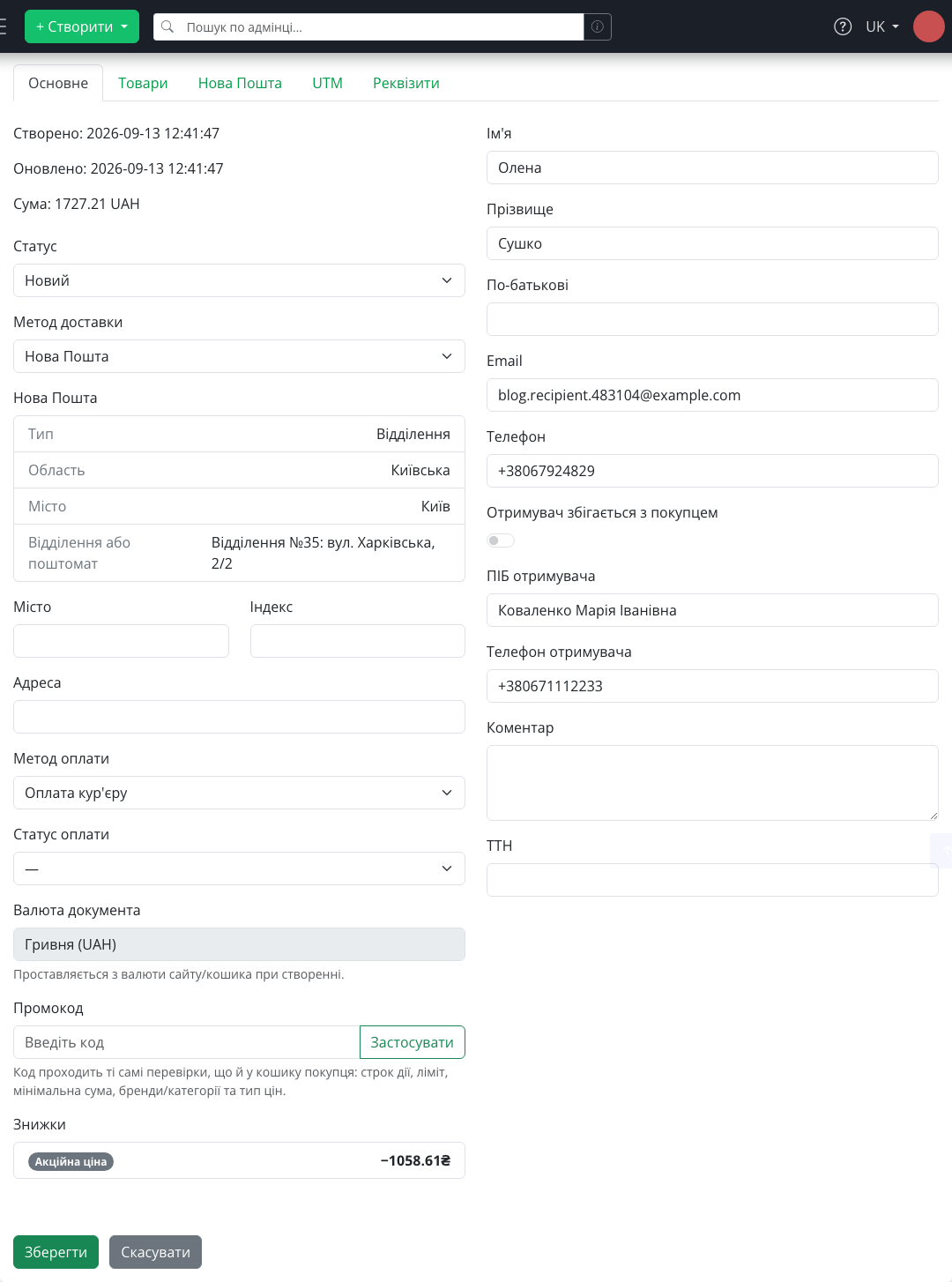
The worst thing that could happen to a feature like this is recipient data being saved but overlooked by the manager. So in the admin order card we placed a toggle, "Recipient is the same as the buyer", right under the buyer's phone. When the buyer named someone else, the toggle is off and the "Recipient's full name" and "Recipient's phone" fields sit below it. The manager can fix a typo in the surname or, conversely, switch the toggle on if the buyer called back to say they will collect the parcel themselves: the fields are then cleared automatically.
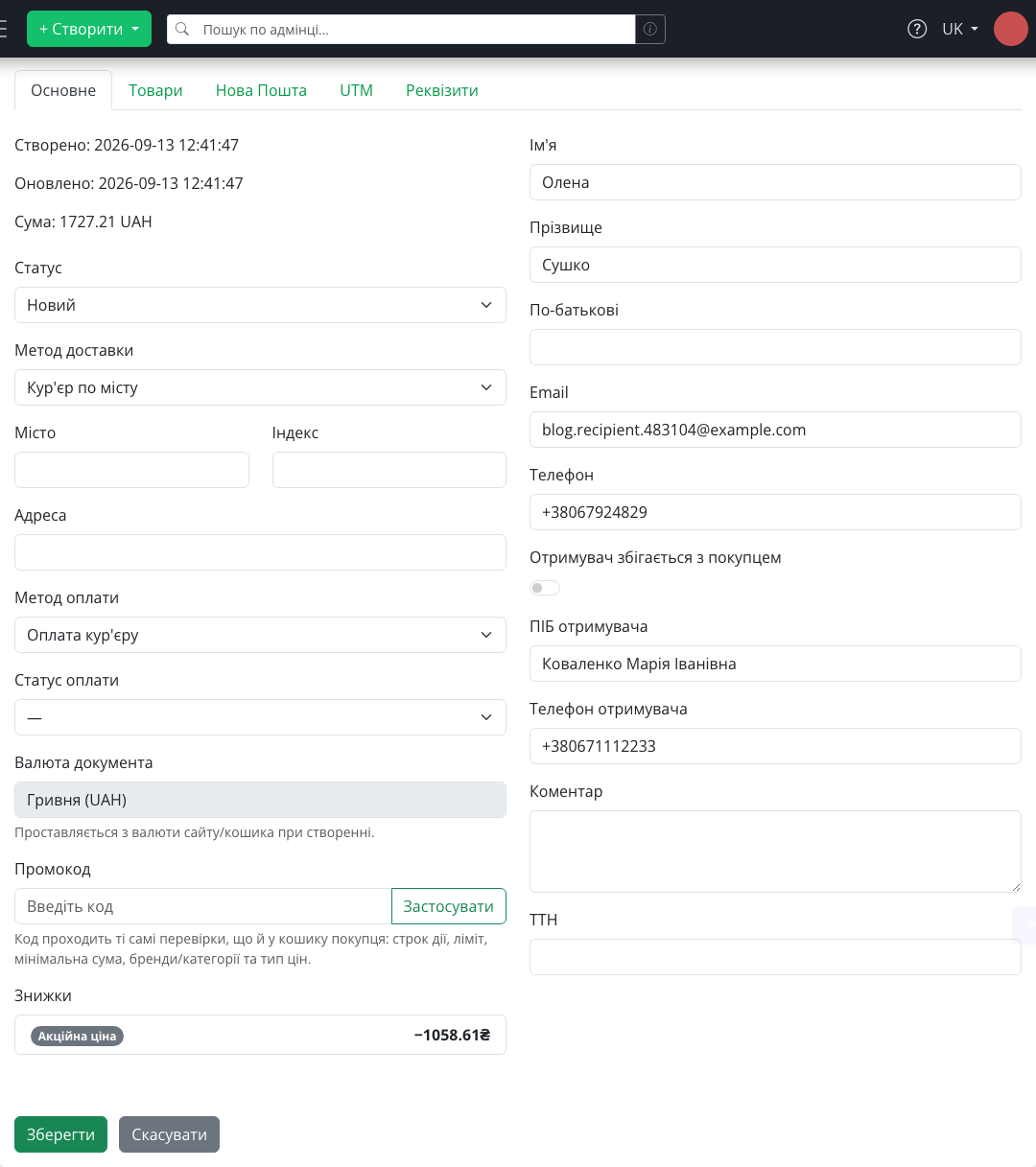
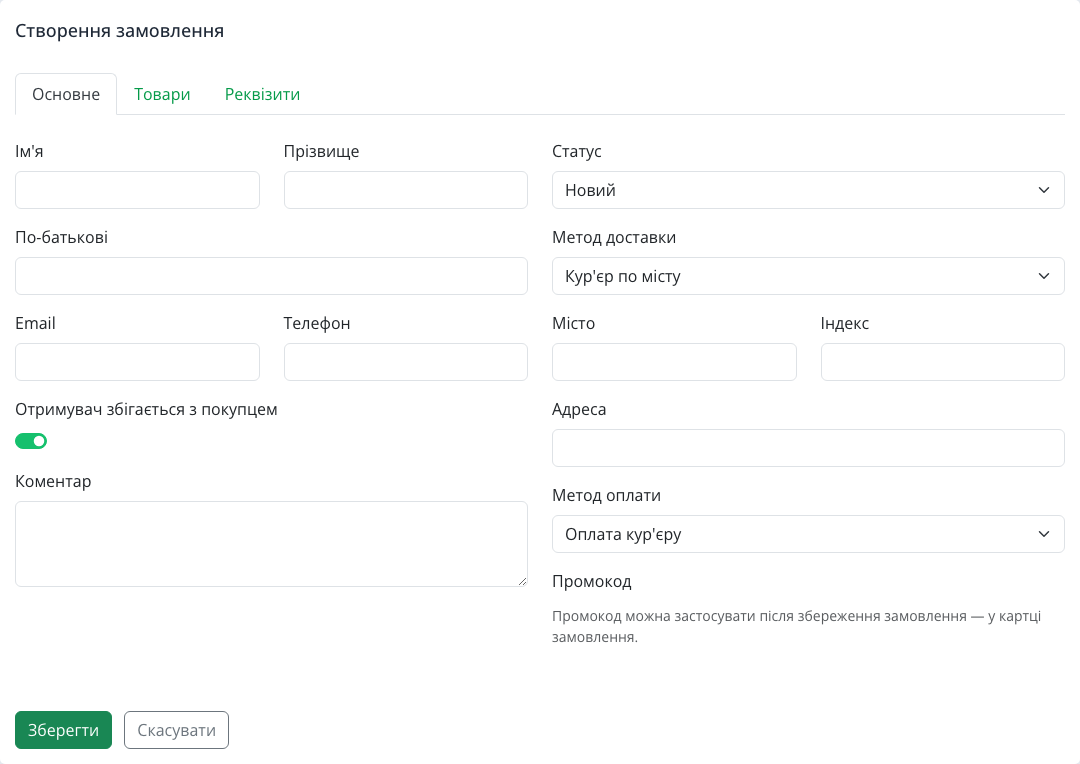
The same toggle is available in the manual order creation form, for cases when a client dictates an order over the phone and asks to ship it to someone else. It is on by default, so regular orders are created exactly as before.
Emails, Telegram and the customer account: the recipient is never lost
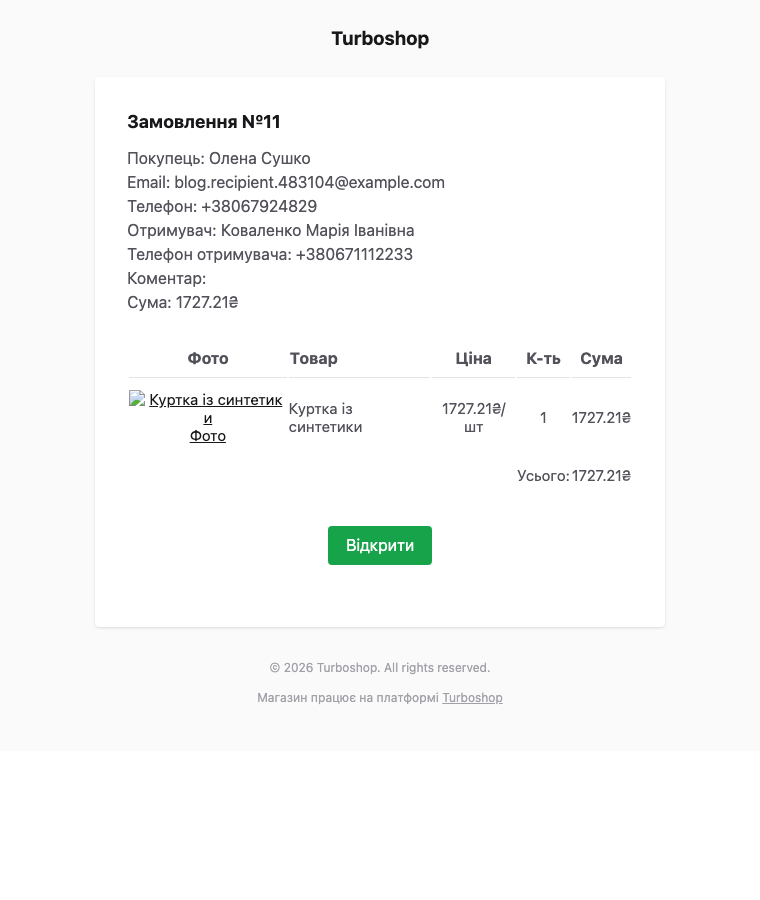
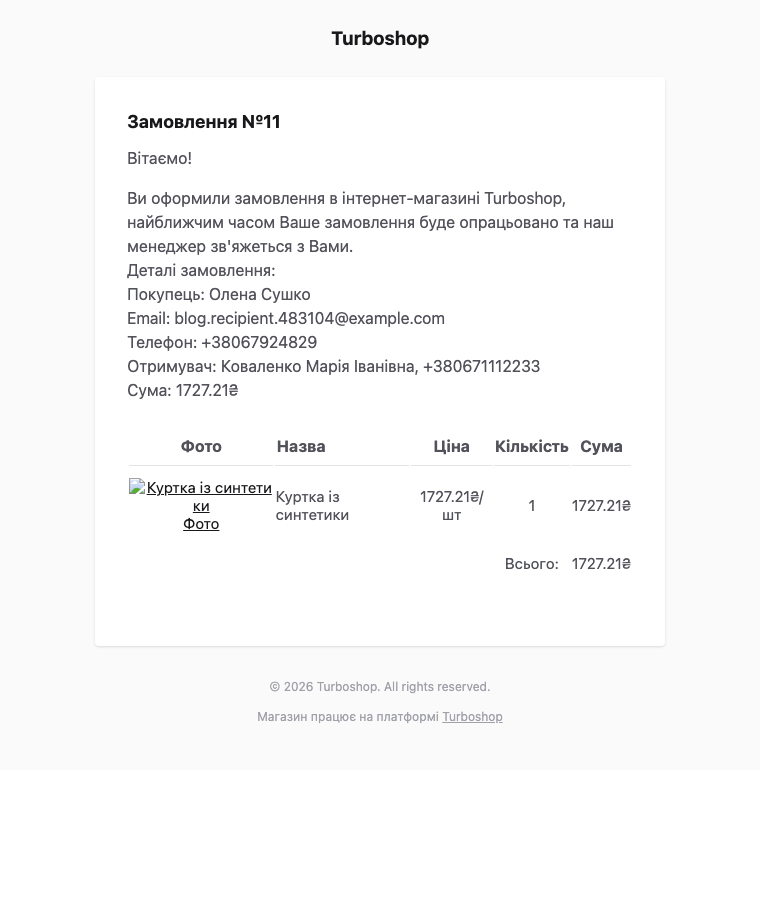
We carried the recipient through every notification, because managers often work from their phone rather than the admin panel. In the new-order email to the administrator, two lines appear after the buyer's phone: "Recipient" and "Recipient's phone". In the Telegram notification the line "Recipient: name, phone" sits between the buyer's phone and the order total; we placed it there deliberately, because the manager needs to see at once who to call about the parcel. The buyer's confirmation email also shows who they named as recipient, so a mistake can be fixed before shipping.
In the customer account, in the order list, we added the line "Recipient: name, phone". It is shown only for orders where the recipient really is a different person; regular orders look the same as before.

Nova Poshta: the waybill is issued to the recipient, not the buyer
This is the part we built the whole feature for. When the manager opens the "Nova Poshta" tab in the order card, the express waybill form fills in the recipient's phone and full name, not the buyer's. We split the "Surname First name Patronymic" line into the three separate waybill fields automatically, which is why checkout asks for the name in that order. The manager only has to enter the weight and declared value and click "Generate waybill". Without this feature every such waybill would mean replacing the recipient by hand, and a single wrong letter in the surname would mean a refusal at the branch.
If you have not connected Nova Poshta delivery yet, start with our step-by-step Nova Poshta setup guide: without an API key and branch directories the waybill form will not work.
For integrators: the same fields in the API
If orders reach the store from a CRM or an accounting system, the order creation API method accepts the recipient_name and recipient_phone fields. You do not have to send a separate "recipient is the same as the buyer" flag: when recipient data is present, we set it ourselves. Order lists and cards return these fields, so your back-office system sees the recipient exactly as the manager does.
How to enable it
- Update the store to the current platform version: the checkbox appears at checkout automatically, there are no separate settings.
- Check the "Recipient is the same as the buyer" toggle in any order card.
- If you ship with Nova Poshta, make sure the account and directories are connected, and the waybill form will fill in the recipient on its own.
- Add the phrase "You can order for another person" to your delivery terms: buyers are more willing to buy gifts when they see it is supported.
Examples by niche: where we see the biggest effect
- Flowers and gifts. Almost every order is for someone else. The recipient goes on the waybill and gets the carrier's SMS, while the confirmation call goes to the person who paid.
- Kids' goods and toys. Grandparents order for grandchildren in another city; the recipient's phone belongs to the parents who collect the parcel at the branch.
- Dropshipping and B2B. Your business client places the order straight to their own customer: they pay, and the parcel goes to the end recipient without reshipping.
- Appliances and home goods. A son buys a washing machine for his parents: the waybill is in the parents' name, the receipt and order history stay in the son's account.
- Corporate orders. An office manager orders for a colleague at a branch office; the store manager does not have to call accounting to ask who will collect it.
FAQ
Do I need to configure anything for the checkbox to appear? No. It is in checkout out of the box after the update; there is no separate switch in settings.
What if the buyer names themselves as recipient? The order is saved with whatever the buyer entered. We deliberately do not check for matching phones: sometimes a person gives a second number.
Does the recipient see the order price? No. The recipient only gets the carrier's SMS with the waybill number; store emails go to the buyer.
Does this work in "Quick order in 1 click"? No, that form has only a name and phone. To order for someone else the buyer goes through the regular checkout.
Can the recipient be changed after the order is placed? Yes, in the order card: switch off "Recipient is the same as the buyer" and enter the details, or switch it on to clear them.
Summary: what you get
We built the "other recipient" option so that gift orders and purchases "for someone" stop being a source of calls, confusion and refusals at the branch. You get one checkbox at checkout, two fields in the order card, the recipient in emails, Telegram and the customer account, and a Nova Poshta waybill issued to the right person without retyping. For more on how we keep making delivery simpler, see the "Features" section.