
We at Turboshop see it in every customer's store: a visitor viewed a product, put it in the cart — and moved the cursor up, to the tab's close button. In most stores that is where it ends, in silence: not a word after them, no attempt to stop them. And you have already paid for that visit with ads or months of SEO work. So we built the "Retention (exit-intent)" widget — it gives your store the last word: a popup with a promo code for signing up, or a reminder "Your cart stays here" with the total and a return button. Here is how we taught it to recognise the moment of leaving, which variants we built in and why.
How we taught the widget to know the person is leaving
We did not want a popup that jumps out "just because" on a timer: people read that kind of popup as spam. So on desktop there is one signal: the cursor flew past the top edge of the window — where the tabs, address bar and close button are. On phones there is no such gesture, so we took a different one: a sharp scroll up after the person has passed half the page. That is typical behaviour before reaching for the "back" button — and that is exactly what we catch.
To avoid scaring casual visitors we added a guard, "Minimum time on site, seconds" (15 by default): the window will not appear earlier, even if the cursor is already heading for the close button. Someone who opened the site by mistake and left immediately will not see the popup — and you will not spend your last argument on someone who never meant to buy.
Two variants: default and "cart" — because the situations differ
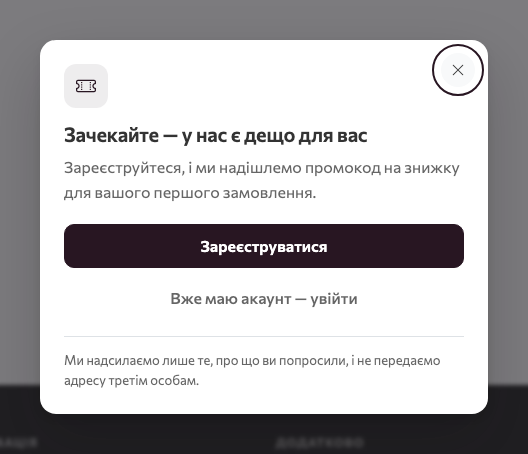
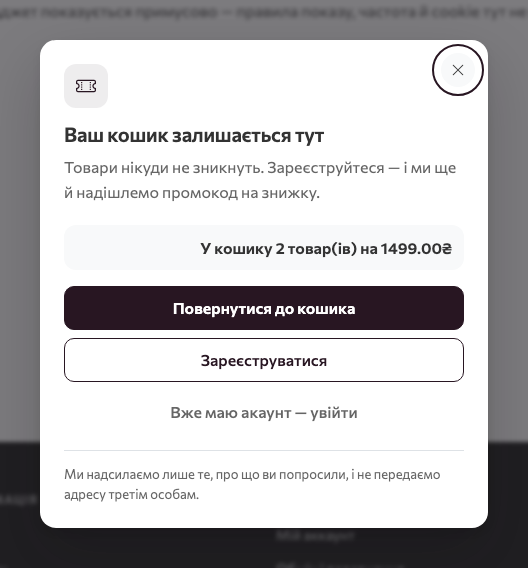
We built two sets of texts into the widget, and it picks the right one itself. The reason is simple: a person with an empty cart and a person with three items worth a few thousand hryvnias need to hear completely different things.
- Default — for a visitor with an empty cart: "Wait — we have something for you" and an offer to sign up for a discount promo code. You get the contact of a person who would otherwise leave without a trace.
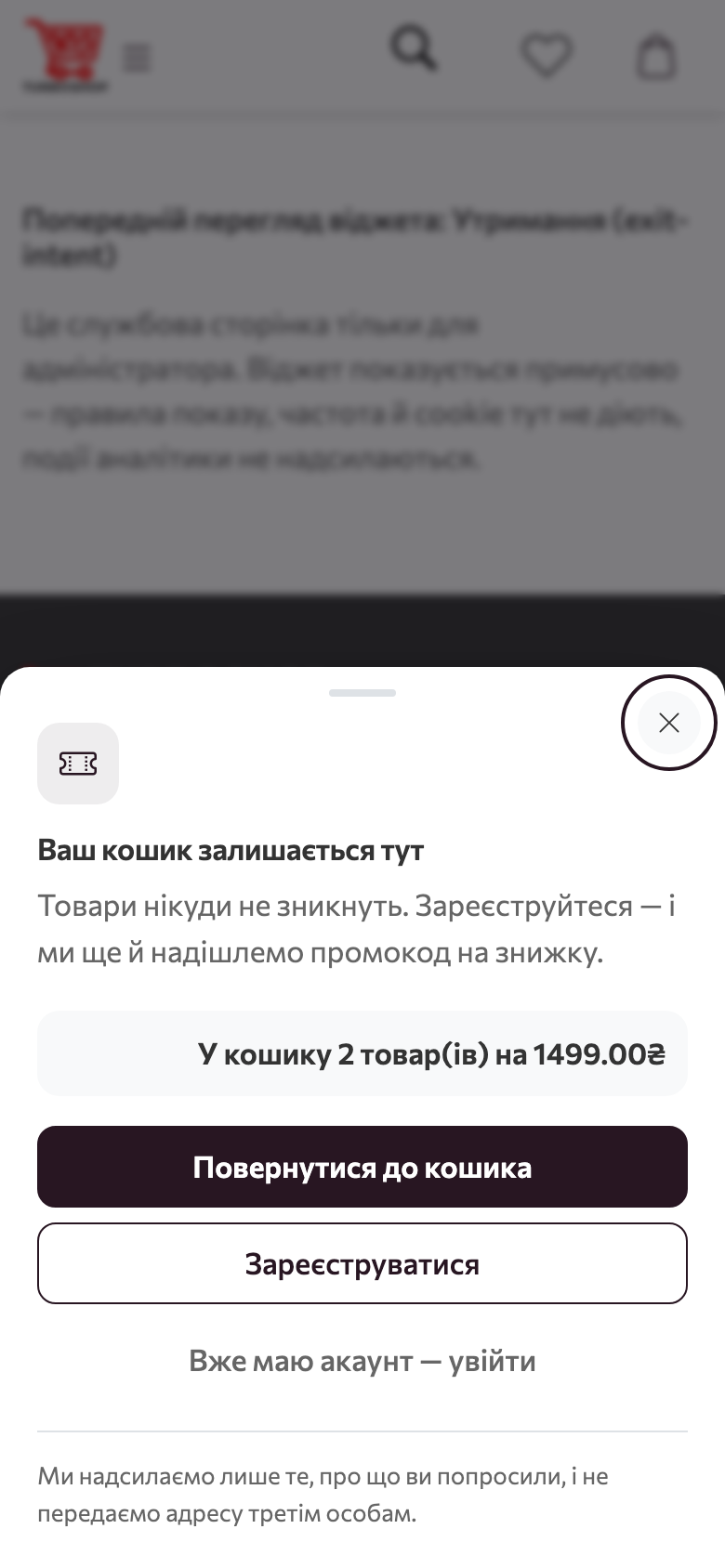
- Non-empty cart — "Your cart stays here": thumbnails of up to three items, quantity and total, a big "Back to cart" button, and only below it — sign-up and the promo code. We deliberately put the cart above the discount: that is not "give me a discount" but a reminder that the choice is made and can be completed in a minute. The person sees their items — and the abandoned cart stops being abandoned.
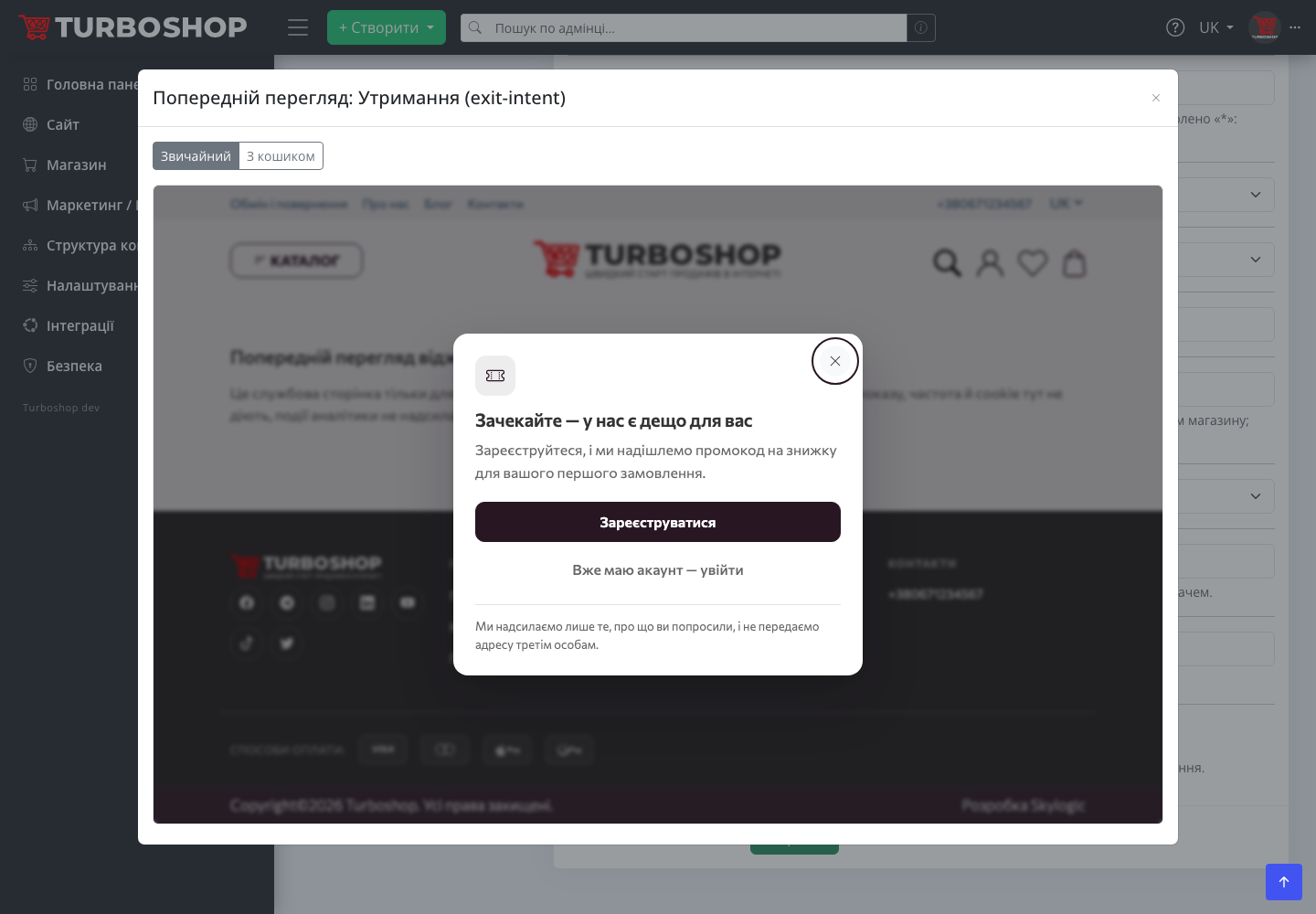
You can view both variants in the preview without enabling the widget: the modal has a "Default" / "With cart" switch, and for the second one we substitute a demo cart of two items. That way you see the result through the shopper's eyes before the first shopper does.
The COMEBACK5 promo code: why we created it for you, but disabled
We built Retention on a shared promo code: one for everyone, with no usage limit. So that you do not spend time creating a promotion, every store already has the system promotion "Retention: −5 % on all products" with the code COMEBACK5. We created it disabled — on purpose, so that a public discount does not go live by itself after the update: the decision about when and to whom to give a discount belongs to the owner, not to a platform update. Activate it with the "Activate system promotion" button right in the widget tab, or pick your own code in the "Promo code" field.
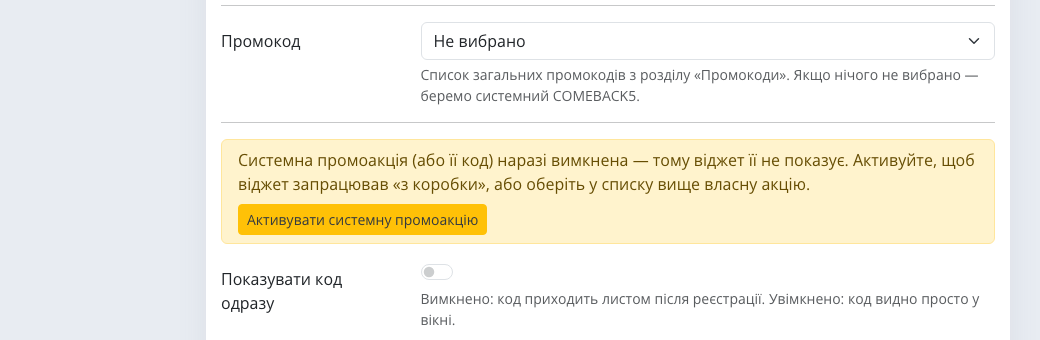
We added the "Show the code immediately" toggle because stores differ. Off — the promo code for sign-up arrives by email, and you get the customer's contact to work with later. On — the code is visible right in the window: for inexpensive items where speed matters more than collecting contacts, this works better. You choose what is worth more to you today: the base or the instant order.
Display on the cart page: the only exception we allowed
Popups in Turboshop never appear on checkout pages — there the person is already doing what you need, and we refuse on principle to get in the way. Retention is the only exception, and it is enabled deliberately with the "Show on the cart page" toggle. Cart and checkout are one page on the platform, so only the "cart" variant works there: a reminder about the items left, for someone who reached the finish line and suddenly turned around. On the "thank you for your order" page after payment the popup is never shown — we leave a shopper who has already paid alone.
On phones
We made the mobile popup a bottom sheet that slides up: the same items, total and buttons, nothing cut off. It closes with the cross or a swipe — a gesture the hand already knows. We know most visits to our customers' stores are mobile, so the cart variant on a phone matters no less than on desktop.
What we recommend considering
- Without an active code the widget is not shown. The admin panel warns about it in the tab — so you do not wait for results from a disabled widget.
- One popup on screen. If other popups are enabled, the queue is governed by priority and the pause between popups from the "General" tab. We will not let your store greet a person with three windows at once.
- Audience. In the "Where to show" block the popup can be limited to guests — signed-in customers keep their cart anyway.
- Frequency. "Once per session" by default and "Do not show again, days" after closing — visitors will not be chased on every page. Visitor retention works only while it stays polite.
Examples by niche: how we recommend setting it up
- Clothing, shoes. The cart variant shown on the cart page: people pick sizes for a long time — a reminder about the items brings them back to checkout, not to a competitor with the same jacket.
- Home goods, small appliances. The default variant with the code shown immediately: a quick −5 % on an inexpensive purchase, where an extra email step only slows things down.
- Furniture, expensive goods. The code by email after sign-up: the customer's contact matters more than an instant discount, because the decision takes more than one visit — and you can remind them of yourself when they return to choosing.
- Groceries and food delivery. The cart variant with the discount out of the spotlight: the person assembled an order and got distracted — the big "Back to cart" button brings them back in a second.
How to enable it in a minute
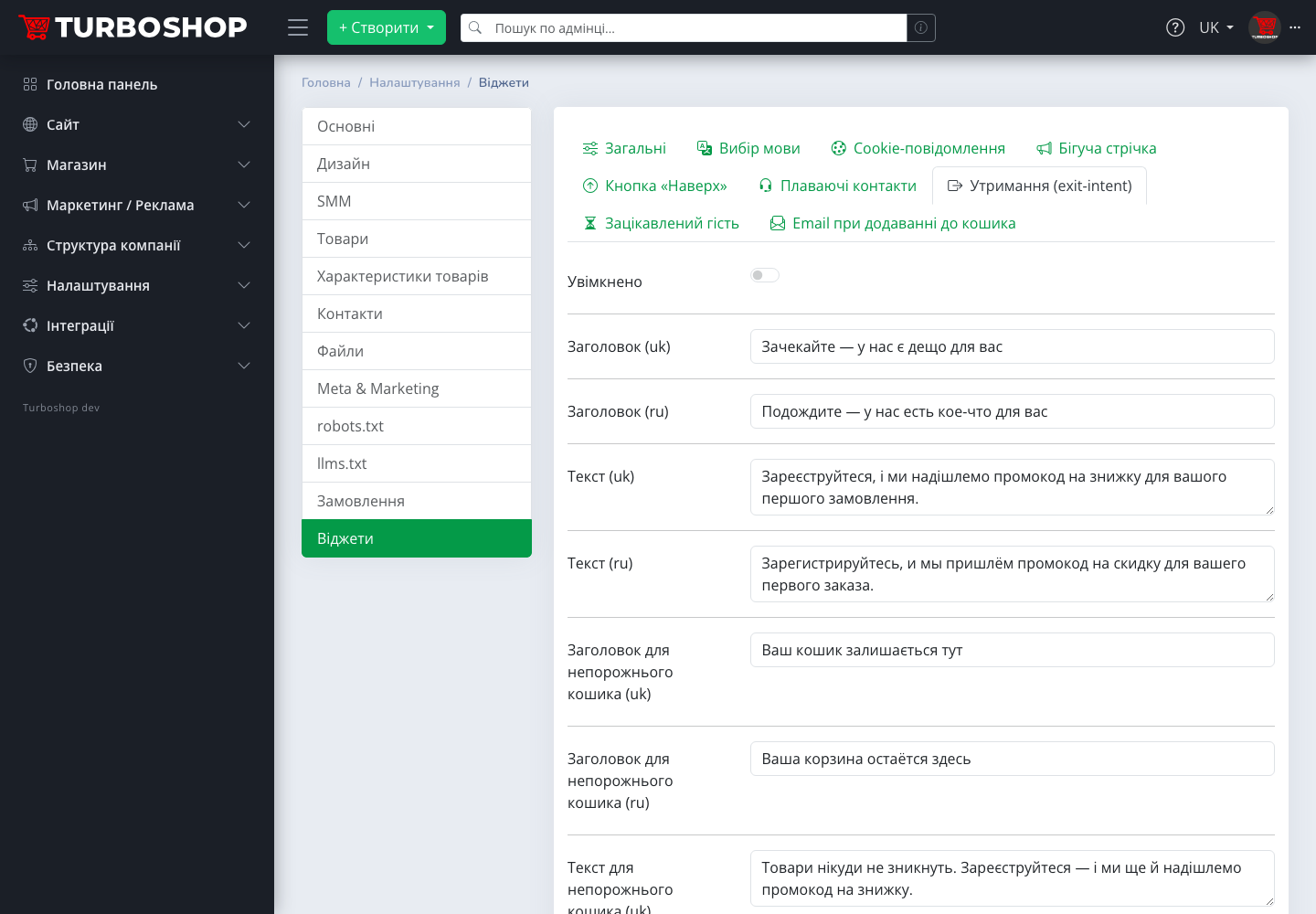
- Open "Settings → Widgets", the "Retention (exit-intent)" tab.
- Click "Activate system promotion" or pick your own code in the "Promo code" field.
- Review the texts for both variants — they are pre-filled, but the emphasis can be adjusted to your niche.
- Decide whether to show the code immediately or send it by email, and whether you need the cart-page reminder.
- Switch on "Enabled", save and check both variants in the preview.
After that we recommend opening the "Promo codes" section to make sure the "Retention: −5 % on all products" promotion is marked active and its card has no date limits you did not plan.
The promo code email and analytics: we tagged the links with UTM parameters
Both links in the promo code email, "To the catalog" and "Set a password", carry UTM parameters: source widget, medium email, campaign widget-exit. In Google Analytics a visit from the email shows up as the Email channel with the campaign named after the widget, and an order placed after it lands in the admin UTM orders report. So you see not just "the widget is on" but how many orders it actually brought. Widget links on the storefront itself carry no UTM parameters; otherwise an internal tag would override the real source of the visit.
FAQ
Won't the popup annoy visitors? We made it appear only on a clear intent to leave, not before the set time on site, once per session and with a pause after closing. It is the least intrusive type of popup.
Can I use my own promo code? Yes, pick it in the "Promo code" field from the shared codes of the "Promo codes" section. The system promotion can then stay off.
Will someone who has already ordered get the code? The shared COMEBACK5 code works for everyone who signs up through the popup. Personal first-order codes belong to other widgets.
What do search robots see? Nothing: we hide popups from bots, the index stays clean.
Summary: what you get
We built the exit-intent popup as the cheapest second chance: the shopper is already here, has already chosen, and only needs a reminder about the cart or a small discount — no retargeting ads, no third-party services. Imagine: a popup on tab close brings at least some of those who leave in silence today back to checkout — and those are carts you had almost lost. We recommend enabling the cart variant with display on the cart page: it works with the warmest visitors. The overview of the whole section is in "Storefront widgets in Turboshop", and email capture at the moment of adding to cart is covered in "Email on add to cart". All new platform capabilities are in the "Features" rubric.