
Before buying from an unfamiliar store, a shopper looks for one thing — proof that it is safe to pay here. Reviews from other customers deliver that proof better than any marketing copy: social proof that works around the clock. Every Turboshop store ships with a built-in reviews module: customers rate products, the store replies, ratings appear in the catalog, and search engines receive structured data for star snippets. Here is how it works and what it does for sales.
What the reviews module does
- 1-to-5 star rating — from “Poor” to “Excellent”;
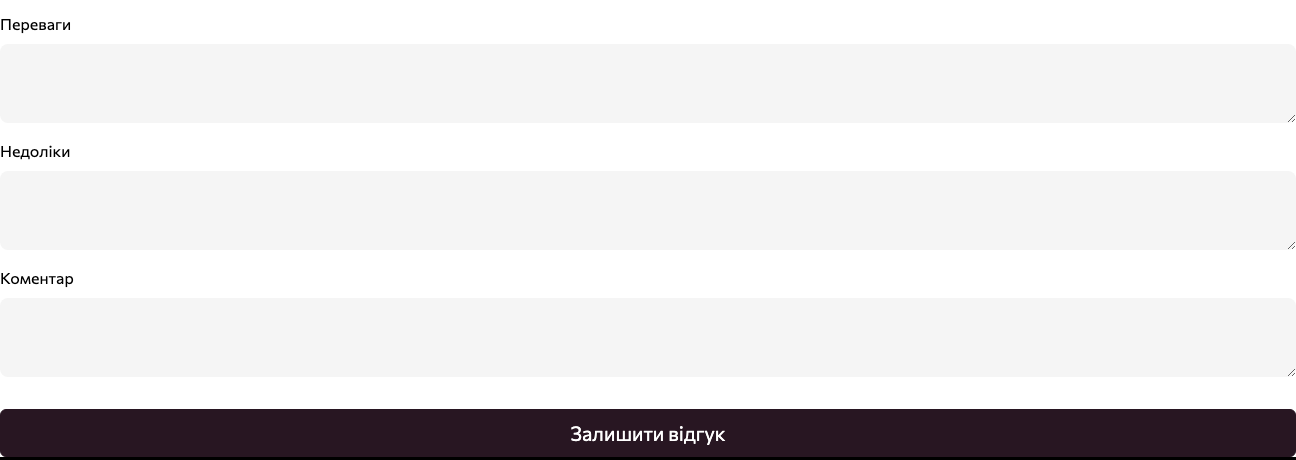
- structured feedback: separate “Pros” and “Cons” fields plus a free-form comment — much easier to scan than a wall of text;
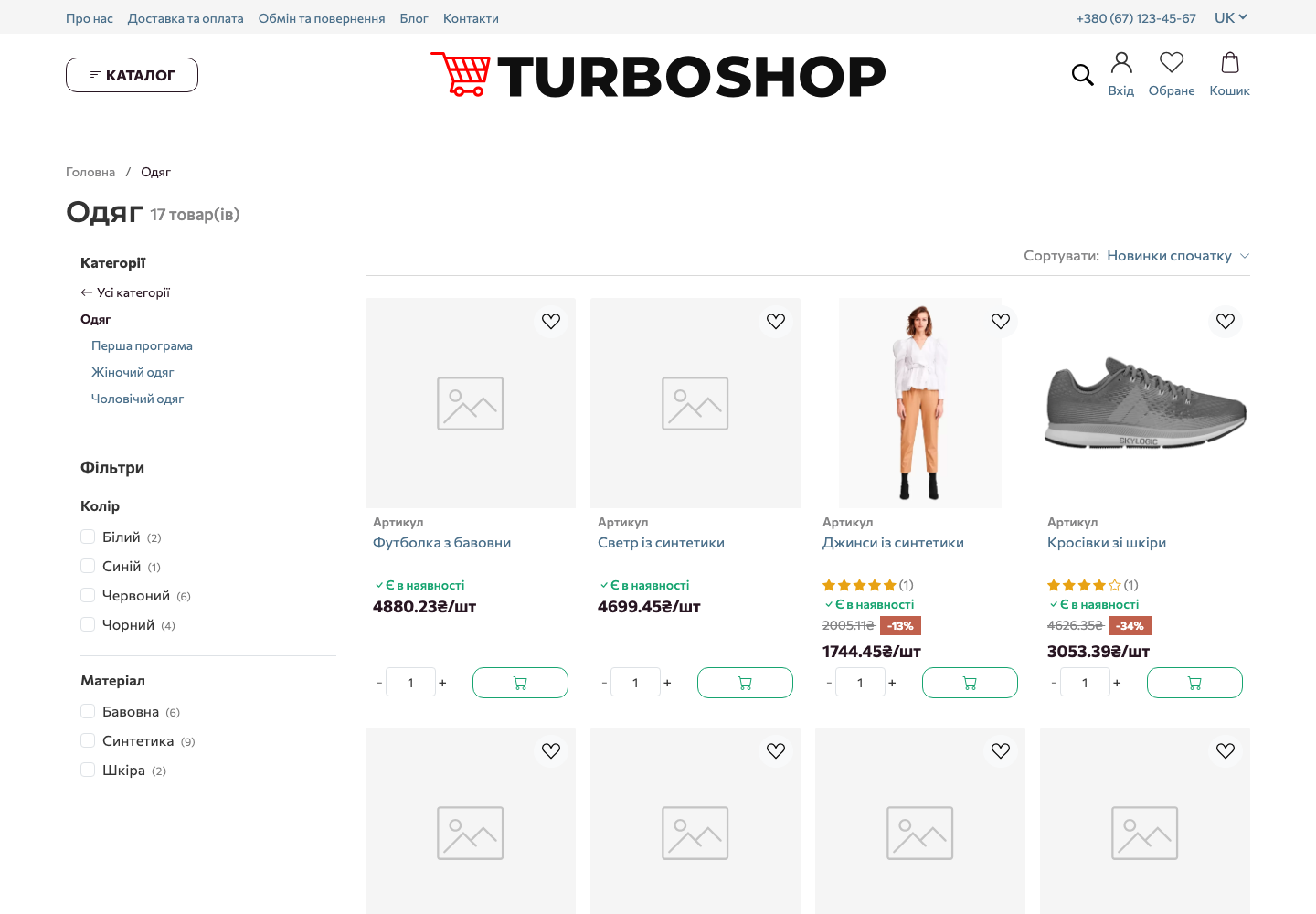
- average product rating with a review count on the product page, and stars on catalog cards;
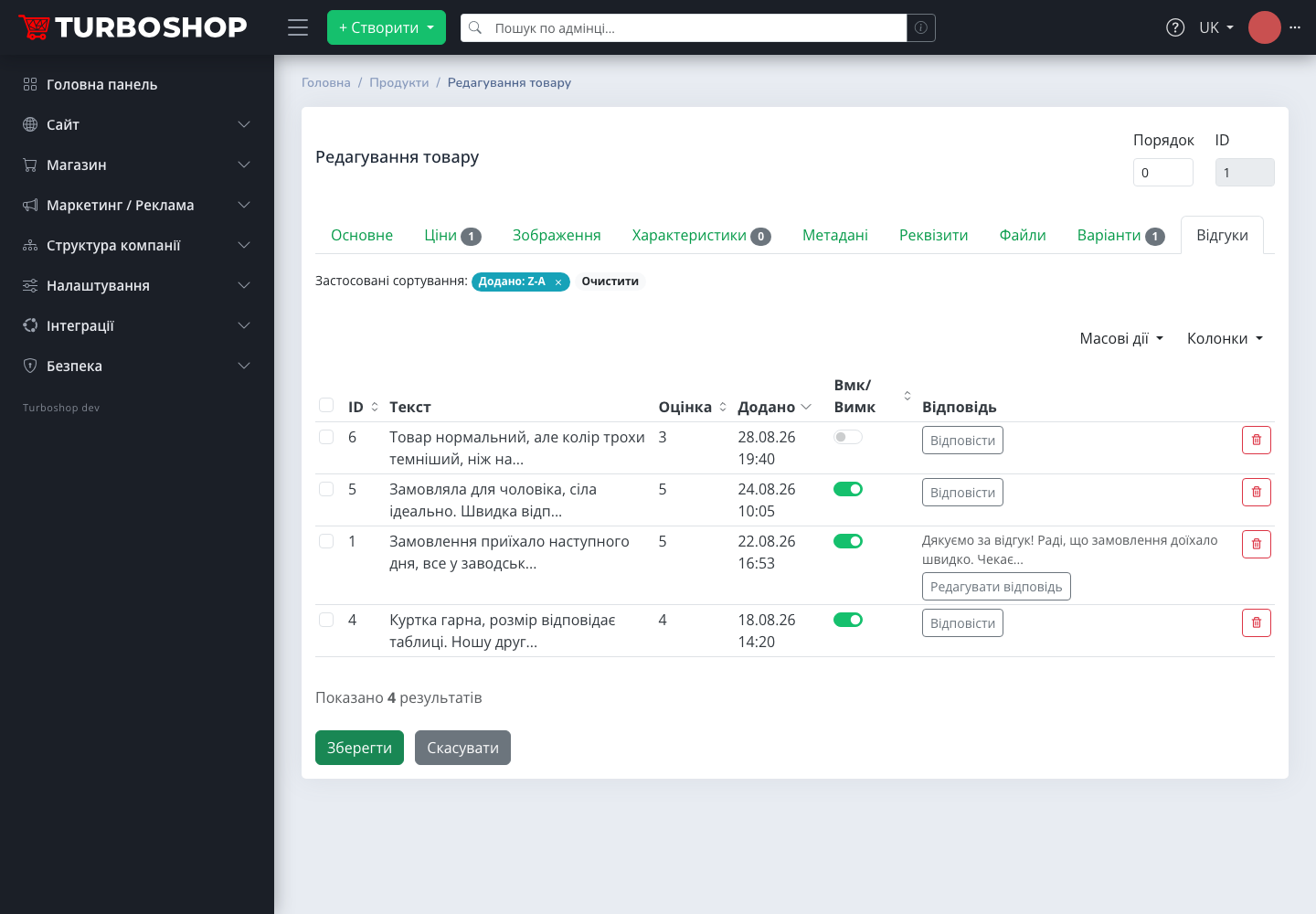
- pre-moderation: a new review stays off the storefront until you approve it;
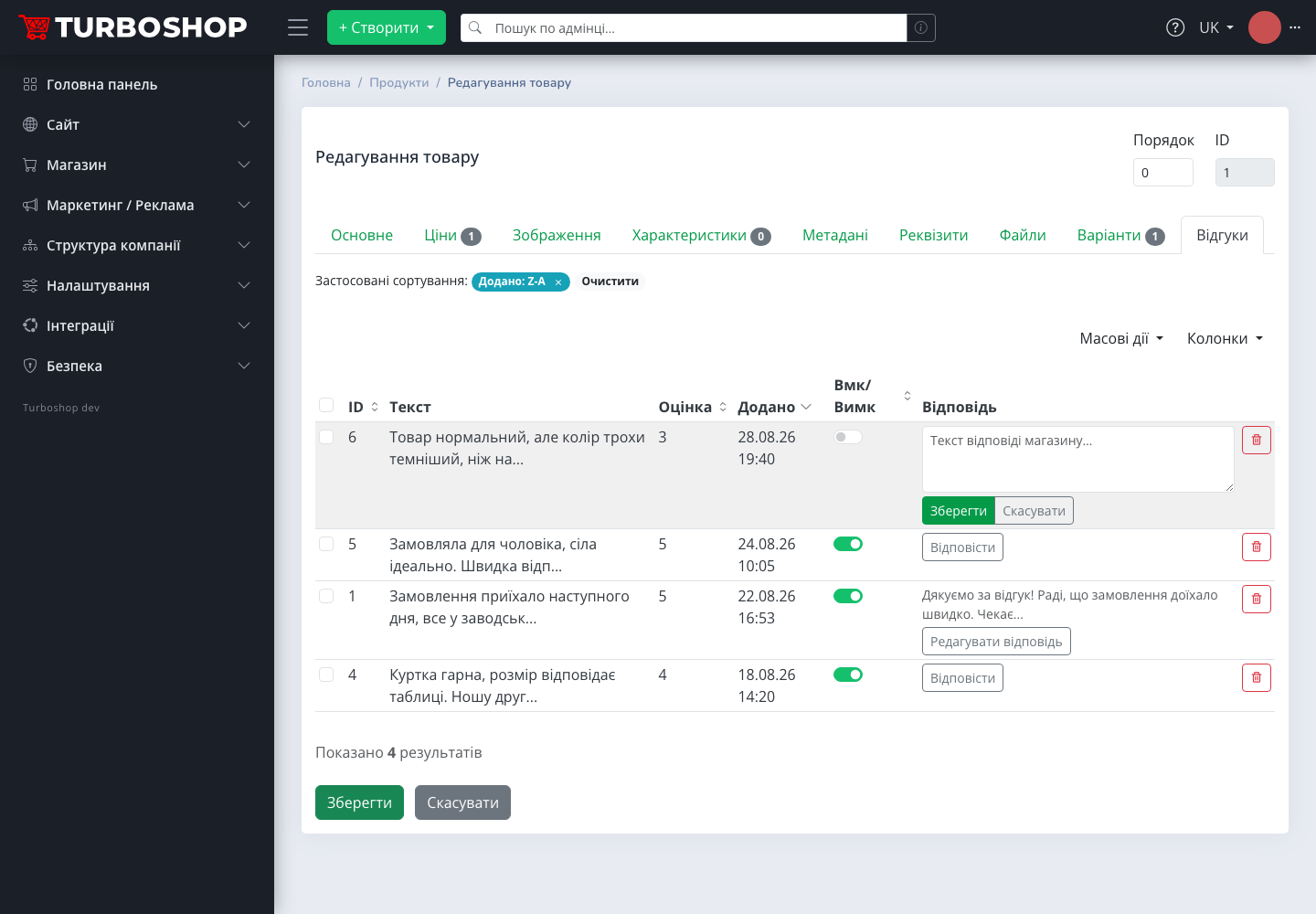
- store reply to any review — published beneath it as a separate block;
- Schema.org AggregateRating markup — the foundation for star snippets in Google.

How a customer leaves a review
Below the product description sits the “Reviews” block with a form: a star rating, pros, cons and a comment. Only signed-in customers can post reviews — guests see a sign-in prompt instead. That is a deliberate choice: anonymous spam and competitor “one-star bombing” are cut off at the door, and every review is tied to a real account. Rate limiting adds another layer — flooding a product with fake reviews in one evening is technically impossible.
Moderation: you decide what goes live
A fresh review lands in the admin panel, not on the site — the product editing page has a “Reviews” tab. It shows the text, rating and date, with a publish toggle next to each review: switch it on and the review appears on the storefront, switch it off and it is hidden. You keep spam and abuse away from the storefront without losing honest criticism (more on why you should publish it in the FAQ below).
The store reply is half the effect
Shoppers read not only the reviews but also how the store responds. A polite thank-you and a calm, constructive answer to a complaint sell better than a dozen unanswered five-star ratings: they show real people behind the storefront who will not vanish after checkout.
That is why replying is built right into the reviews table: click “Reply”, type the text — and it appears on the product page as a separate “Store reply” block with a date. Replies can be edited at any time.
Catalog ratings: stars lead to the product
As soon as a product has approved reviews, its average rating is calculated automatically and shown not only on the product page but also on the catalog card — stars with the review count in brackets. In a list of dozens of similar items, the rated product catches the eye first — the cheapest way to highlight proven products without a single banner.
The mobile version is not simplified: the same rating, the same pros and cons, the same store reply.

SEO: star snippets in Google
The most underrated effect of reviews is search. For a product with approved reviews, Turboshop automatically generates Schema.org AggregateRating markup as JSON-LD: the average rating and the review count. This structured data is exactly where Google takes the stars it shows next to products in search results (rich snippets).
What that means in practice:
- visibility in search results. A snippet with stars is visually larger and stands out among plain blue links — CTR grows without a cent spent on ads;
- unique content. Every review is text written in the customer’s own words — the same words people actually type into search. The product page keeps growing fresh content with no copywriter;
- a freshness signal. A page regularly updated with reviews looks alive to search engines — unlike a card unchanged for years.
The markup is added automatically — nothing to enable or configure. It is the same “SEO out of the box” principle as in the catalog filters: the platform handles the technical side.
Why reviews matter for your store
- trust of a first-time visitor. For a store without a big name, reviews are the main “it is safe here” argument, alongside an SSL certificate and clear delivery terms;
- faster decisions. The pros/cons structure answers the shopper’s questions before they open the chat — fewer doubts, fewer abandoned carts;
- fewer returns. An honest “runs small, size up” review saves both you and the customer the cost of shipping it back;
- assortment feedback. Recurring complaints about one product are a purchasing signal before they become a stream of returns;
- free SEO content — see above.
Examples by niche
- Clothing and footwear. Size-accuracy reviews are the most-read block of the card; “Cons: runs small” answers half the chat questions upfront;
- Electronics. Customers describe real-life usage — the things a manufacturer’s spec sheet never says;
- Cosmetics. Reviews mentioning skin or hair type help the next shoppers recognise themselves and commit;
- Kids’ goods. Parents trust parents: “my three-year-old loves it” convinces better than a description;
- Auto parts. “Fit my Lanos 1.5 with no modifications” is the compatibility proof shoppers open the card for.
What you need to configure
Nothing. The reviews module already works in every Turboshop store: the form on the product page, the Reviews tab in the admin product editor, automatic ratings and Schema.org markup. The only regular task is moderation — approve new reviews and reply to them.
FAQ
Can a guest leave a review without an account? No. Reviews are accepted from signed-in customers only — protection against spam and competitor manipulation. Guests see a sign-in button.
Does a review appear on the site immediately? No, it goes to moderation first. It becomes visible after you switch its publication on in the admin panel.
Should negative reviews be published? Usually yes. A storefront of nothing but five-star ratings looks suspicious, while a negative review with a calm store reply builds trust. Hide spam and abuse, not honest criticism.
How do I reply to a positive review? Thank briefly and reinforce the relationship: “Thank you for the review! Glad the order arrived quickly. See you again.” For a negative one — acknowledge the problem and explain the fix: “Sorry about the delay — we filed a claim with the carrier and sent you a promo code for your next order.”
Where do the Google stars come from? From the Schema.org AggregateRating markup Turboshop generates automatically for products with approved reviews. Showing the stars is ultimately Google’s decision, but without the markup they will not appear at all.
Is the rating visible in the catalog? Yes — card templates with a rating show stars and the review count on product cards. The card template is switched in the design settings, no developer needed.
If you are only planning to create an online store, see which tools for online store promotion are already built into the platform.
Summary
The reviews module delivers three effects at once: first-time visitor trust, faster decisions thanks to the pros/cons structure, and an SEO bonus in the form of star snippets. Everything ships built into every Turboshop store with zero configuration — all that is left is answering your customers. Explore more platform capabilities in the “Features” section.