

Money in an online store rarely disappears loudly. It quietly gets stuck: a customer paid by card, and the order has been "New" for three days. An online payment failed, and nobody told the person they could try again. A parcel was packed, but the waybill was never created. Each case alone is minor; together, over a week, they add up to an amount that hurts to see. At Turboshop we made it possible to see it in advance: you ask the AI assistant "Where am I losing money right now?", and it shows all such orders and carts from the largest amount, with a reason and an action for each.
Why we built a separate report instead of yet another admin filter
All this data is in the admin panel: payment statuses, order statuses, waybills, carts. But to find problem orders you need to know which filters to combine and remember how much time counts as normal. Nobody does that every morning. So we described these rules once, inside the store, and gave them to the AI assistant as a dedicated tool. The assistant does not guess what counts as a risk: rules and thresholds are set in the store, and every answer shows which thresholds were used.
If you have not met the assistant yet, start with "An AI assistant for your online store"; what MCP is and why it is safe is explained in "What is MCP".
Seven kinds of money at risk
The assistant checks orders against the rules in turn and stops at the first one that matches. So one order is never counted twice, and the total equals the sum by type.

- Paid but not processed. The customer has already paid upfront, yet the order is still "New" longer than the threshold. This is the worst case for reputation: the person paid and hears nothing.
- Failed online payment. The payment expired or was declined by the bank. Often the customer simply did not enter the code in time — and is waiting for a reminder.
- Refused parcel. A cash-on-delivery order that was not picked up. Shipping money is already spent, and the goods are coming back.
- Unpaid online. An online payment was started but not completed for longer than the threshold.
- Not shipped. The order is processed but has no waybill for longer than the threshold. The customer is waiting while the parcel sits in the warehouse.
- Refund. The payment was refunded — a signal to look into the reason.
- Abandoned cart. A cart with no activity for more than a day; the assistant shows whether there is a contact to reach out.
A real answer: one week in the demo store
We asked the assistant about the last seven days of our demo store. The store returned this summary (demo data, amounts in UAH):
- not shipped on time — 15 orders worth 199,214 UAH;
- abandoned carts — 5 worth 56,466 UAH;
- refused parcels — 2 orders worth 29,236 UAH;
- online payment not completed — 1 order worth 22,307 UAH;
- paid but not processed — 1 order worth 1,406 UAH.
In total, 308,629 UAH needs attention. The largest row: an order worth 36,118 UAH is processed but has had no waybill for 102 hours against a 48-hour threshold. For each row the assistant gives the reason in plain language, the amount, age in hours and a direct link to the order in the admin panel. The buyer is shown only by initials — the manager opens full details in the admin panel.
The key takeaway: the biggest money at risk is often not where you look. The owner thinks about abandoned carts, while two thirds of the amount is orders already sold but not shipped.
You set the thresholds
For one store 24 hours without processing is a disaster, for another it is a normal rhythm. So we moved thresholds into settings. On the "Integrations → AI assistant (MCP)" page there is a "Thresholds" block:
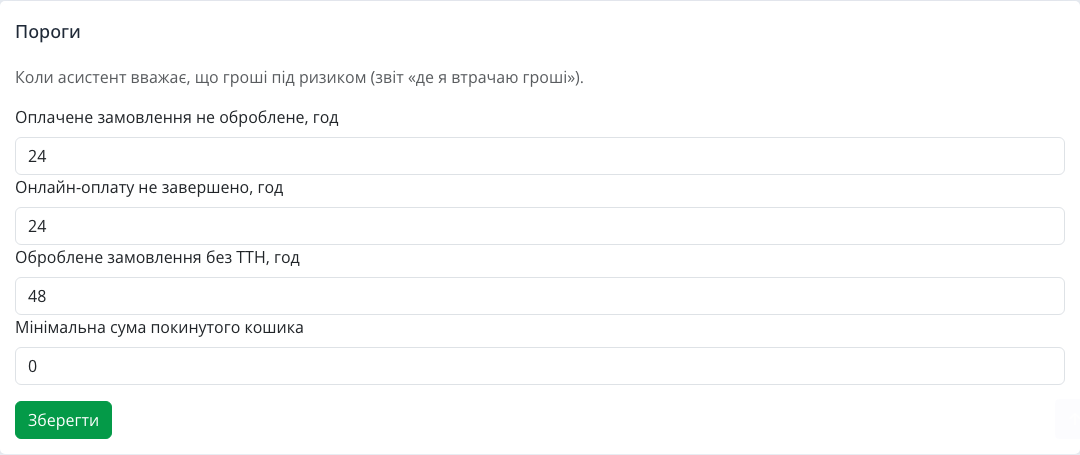
- paid order not processed — 24 hours by default;
- online payment not completed — 24 hours;
- processed order without a waybill — 48 hours;
- minimum abandoned cart amount — 0, meaning all carts.
Click "Save" and the assistant immediately uses the new thresholds. A high-ticket store can raise the minimum cart amount to ignore small carts; a store with fast delivery can cut the no-waybill threshold to a day.
The "Money at risk" scenario: an action plan, not a table
A list is only half the job. That is why the assistant's ready scenarios include "Money at risk": it takes the report and turns it into an action plan, from the largest amount, with a concrete step for each row — confirm the order, remind about payment, create a waybill, message the customer. The shortest version of the same is in the "Morning brief" scenario: the five largest amounts at risk together with yesterday's sales and products running out. By default the assistant looks at the last seven days, but you can ask for another period or only certain types: "show only unshipped orders for the month".
How different niches use it

- Furniture and electronics. A large amount in every row: one unshipped sofa outweighs a dozen small carts. Start the day with the "Money at risk" scenario.
- Clothing and shoes with cash on delivery. The "Refused parcel" type shows which orders customers do not pick up — a reason to reconsider prepayment for such items.
- Cosmetics and gifts. Failed online payments before holidays are ready buyers who need just one reminder.
- Small teams. The manager on shift gets a list with links and does not miss a paid order in the general flow.
FAQ
Can the assistant remind the customer or change the status itself? No. The assistant is read-only: it shows what to do, and the manager takes the action in the admin panel via the link.
Why is a cart not marked as "recovered"? The store does not link a cart to an order, so the assistant honestly does not show such a status instead of guessing.
How is "paid on delivery" counted? Separately from online payments: such orders do not fall into "paid but not processed", because the parcel has already been received.
Can I change the period? Yes, just say "for 30 days", "for last month" or give dates.
The AI assistant is just one of the platform's capabilities. If you are only planning to create an online store, check the "cost of creating an online store" page: hosting, updates and support are already included in the subscription.
Summary: what you get
We turned signals scattered across the admin panel into one answer: how much money is at risk right now, where exactly and what to do about it. You get seven rules, thresholds that match your workflow and a ready scenario that builds an action plan every morning. Other new platform features are in the "Features" section.