
“Orders” is the main working screen of the sales team. Every purchase from the site lands here, and this is where a manager moves it from checkout to shipment.
What you see
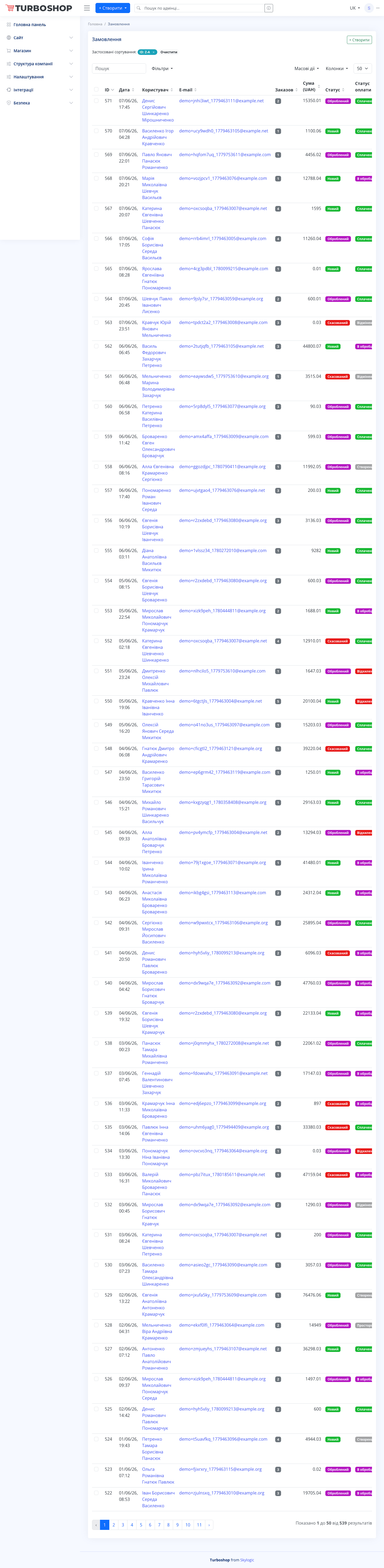
A long list of all orders. Each row shows the number, date and time, the buyer’s name and contacts, the order contents, the total and the current status — a colored label on the right (for example “New”, “Processed”, “Cancelled”). At the top there is a search field and filters to quickly find an order. Pagination is at the bottom.
How it works
- A new order from the site automatically appears in the list with the “New” status.
- The manager opens the order and checks the items, contacts and delivery address.
- Then changes the status as it is processed — this moves the order through the funnel and can trigger customer notifications.
- If needed, an order can be created by hand (the + Create button) — for example for a phone purchase.
Why it matters
This is the single place where nothing gets lost: all sales are under control, you can see what has shipped and what is waiting. Working fast here directly affects revenue and customer satisfaction.